
Content Channels: Automated Affiliate Link Management for YouTube, WordPress, and Hashnode
Content creators lose revenue every day because they can't keep affiliate links updated across hundreds of videos and blog posts. Manually finding and replacing links across an entire YouTube channel or WordPress blog takes hours—time better spent creating content. Linkfuse Content Channels solve this by automatically scanning, discovering, and optimizing affiliate links across all your published content.
What Are Linkfuse Content Channels?
Linkfuse Content Channels are platform integrations that automatically connect to your YouTube channel, WordPress blog, or Ghost and Hashnode publication. Once connected, Linkfuse scans all your existing content—video descriptions, blog posts, articles—identifies affiliate links, and replaces them with localized Linkfuse-managed links. This process runs automatically whenever you publish new content or on-demand when you trigger a manual scan.
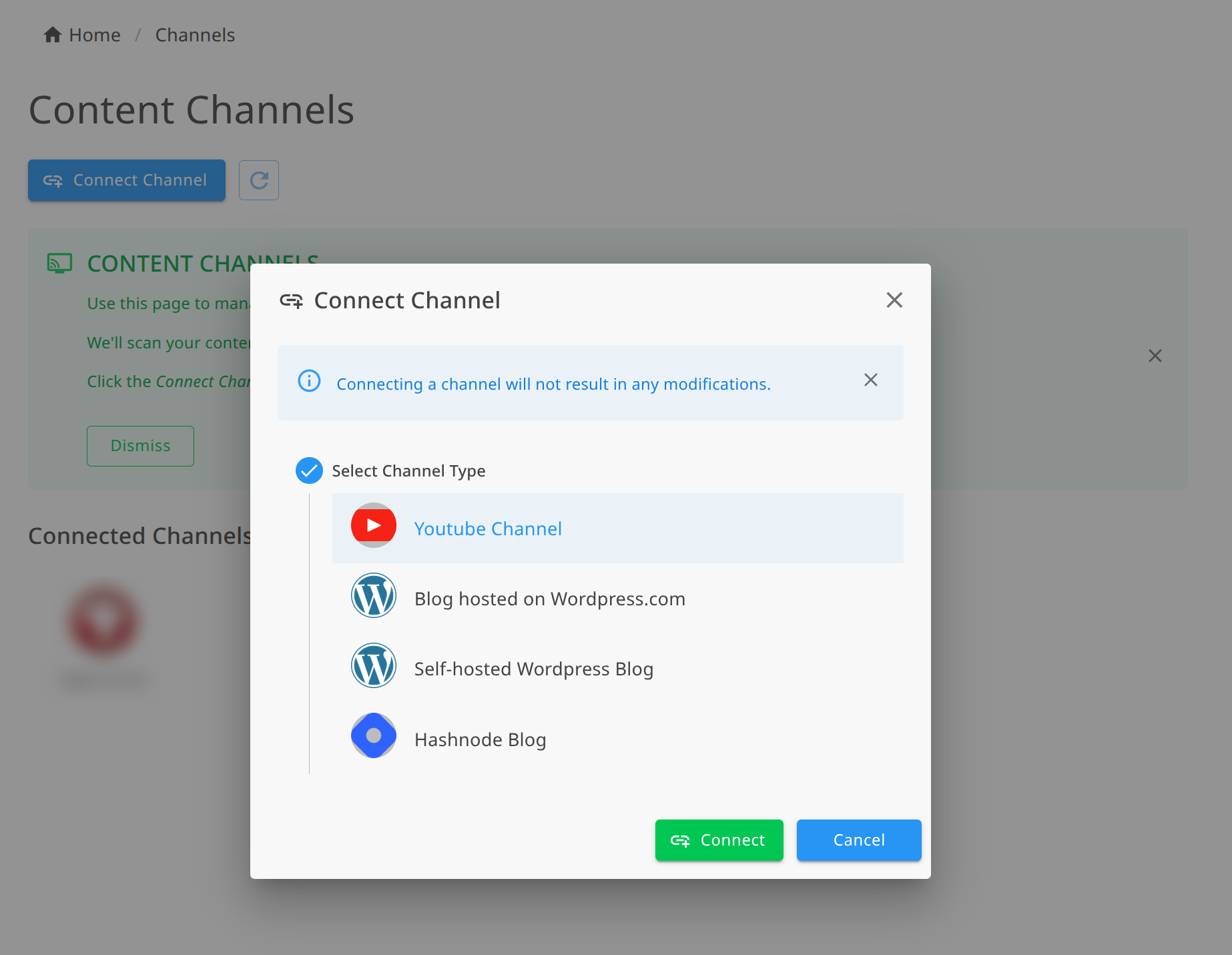
Content Channels currently support four platform types:
- YouTube channels (via Google OAuth)
- WordPress.com blogs
- Self-hosted WordPress installations
- Ghost publications
- Hashnode publications
What Does Link Localization Mean?
Link localization automatically redirects viewers to their regional Amazon store. When a viewer in Germany clicks your affiliate link, they land on Amazon.de instead of Amazon.com. When someone in the UK clicks, they see Amazon.co.uk.
This matters because 85% of shoppers abandon their cart when they land on a foreign Amazon store. They see unfamiliar currency, shipping restrictions, and checkout friction. Localized Linkfuse links eliminate this problem by routing each viewer to their correct regional store—Amazon.com, Amazon.de, Amazon.co.uk, Amazon.ca, Amazon.co.jp, and others.
How Does Each Platform Integration Work?
How Does the YouTube Channel Integration Work?
Linkfuse's YouTube integration connects to your channel through OAuth authentication with Google. After you authorize access, Linkfuse scans all video descriptions across your entire channel—including your back catalog of existing videos.
The YouTube Content Channel integration:
- Uses OAuth authentication for secure Google account connection
- Scans all video descriptions on your connected channel
- Replaces Amazon links with localized Linkfuse links
- Supports WebSub (PubSubHubbub) for real-time monitoring when new videos publish
- Works retroactively on all existing videos, not just new uploads
When you upload a new video, WebSub notifications alert Linkfuse immediately. Your video description gets processed and optimized without any manual intervention.
How Does the WordPress Integration Work?
Linkfuse offers two WordPress integration methods: WordPress.com (hosted) and self-hosted WordPress installations.
WordPress.com Integration:
- Authenticates through WordPress.com's OAuth flow
- Scans all published posts automatically
- Processes HTML content to find and replace anchor tags
- Monitors RSS feed for new and updated posts
Self-Hosted WordPress Integration:
- Connects using Application Passwords or Basic Authentication
- Requires your site URL and credentials
- Scans all published posts on your WordPress installation
- Uses RSS feed monitoring with 5-minute periodic intervals to detect new content
Both WordPress integrations process the HTML content of each post, locating <a href=""> tags containing affiliate links and replacing them with optimized Linkfuse links.
How Does the Hashnode Integration Work?
Linkfuse integrates with Hashnode through API key authentication. The integration uses Hashnode's GraphQL API to access your publication content.
The Hashnode Content Channel:
- Authenticates via your Hashnode API key
- Processes markdown content in your blog posts
- Automatically updates posts with optimized links
- Scans your entire publication history
Key Benefits for Content Creators
Automatic Link Discovery — Linkfuse scans your content and finds affiliate links automatically. You don't need to manually import URLs or maintain a spreadsheet of links. The Content Channel locates every Amazon affiliate link across your videos and posts.
Regional Localization — Each affiliate link redirects viewers to their correct Amazon store based on location. Visitors from the US see Amazon.com. Visitors from Germany see Amazon.de. Visitors from Japan see Amazon.co.jp. This automated localization increases conversion rates by ensuring shoppers always land on a familiar checkout experience.
Retroactive Optimization — Content Channels work on your entire back catalog. A YouTube channel with 500 videos gets all 500 video descriptions scanned and optimized. A WordPress blog with years of posts gets every published article processed. You don't lose revenue from old content with outdated links.
Real-Time Monitoring — WebSub integration for YouTube and RSS feed monitoring for WordPress detect new content automatically. When you publish a new video or blog post, Linkfuse processes it within minutes without manual triggering.
Activity Tracking — Every link replacement is logged. You can see exactly which posts were updated, how many links were processed, and when the action occurred.
Multi-Platform Management — Manage YouTube, WordPress.com, self-hosted WordPress, and Hashnode from one unified dashboard. One account handles affiliate link optimization across all your content platforms.
The Activity Log: Full Visibility Into Every Update
Each Content Channel maintains an activity log showing exactly what Linkfuse processed. The activity log displays:
- Post or video title with thumbnail
- Action taken (e.g., "Updated 3 Links")
- Timestamp of when processing occurred
- Full audit trail of all changes
This transparency lets you verify that links were updated correctly and track optimization progress across your content library.
Getting Started with Content Channels
Connecting a YouTube Channel
- Click "Connect Channel" in your Linkfuse dashboard
- Select "YouTube" from the platform options
- Complete Google OAuth authentication
- Linkfuse automatically scans your channel and begins processing video descriptions
Connecting a WordPress Blog
For WordPress.com:
- Click "Connect Channel" and select "WordPress.com"
- Complete the OAuth authentication flow with WordPress.com
- Linkfuse scans all published posts on your blog
For Self-Hosted WordPress:
- Click "Connect Channel" and select "Self-Hosted WordPress"
- Enter your site URL and authentication credentials (Application Password or Basic Auth)
- Linkfuse connects to your site and scans all posts
Connecting a Hashnode Publication
- Click "Connect Channel" and select "Hashnode"
- Enter your Hashnode publication URL
- Provide your Hashnode API key
- Linkfuse scans your publication and optimizes affiliate links
Monitoring and Automation Options
Content Channels support two monitoring modes for detecting new content:
WebSub/PubSubHubbub (Real-Time) Available for YouTube and some WordPress configurations. WebSub sends instant notifications when new content publishes. Your video descriptions and blog posts get processed within seconds of publication.
RSS Polling (Periodic) Used by self-hosted WordPress and as a fallback for other platforms. Linkfuse checks your RSS feed every 5 minutes for new or updated content. Any changes trigger automatic link processing.
You can enable or disable monitoring per channel. Turn off monitoring for channels you want to process manually, or enable it for hands-free automation.
Connecting your content takes just a few seconds. Once linked, sit back and let Linkfuse do the heavy lifting—scanning, optimizing, and managing your affiliate links so you can focus on what you do best: creating content.
Linkfuse is a link management and affiliate marketing platform built for content creators, bloggers, and affiliate marketers. Connect your YouTube channel, WordPress blog, or Hashnode publication to automatically optimize affiliate links across all your content.