
Complete Guide to Amazon Affiliates on Hashnode: Setup, Automation, and Optimization
Hashnode has become the go-to blogging platform for developers. It's fast, markdown-native, SEO-optimized, and comes with built-in community features that help your content reach a global technical audience. But that global reach creates a monetization problem: when developers from Germany, the UK, or Japan click your Amazon affiliate links for that keyboard you recommended, they land on the wrong storefront—and you lose the commission.
If you're writing developer content on Hashnode and recommending products—programming books, mechanical keyboards, monitors, dev tools—you're likely losing 30-40% of your potential affiliate revenue to geographic mismatch. This guide shows you how to fix it.
Why Hashnode Is Perfect for Developer Affiliate Content
Hashnode has earned its place as the preferred platform for technical bloggers:
Markdown-native workflow. Write in markdown, include code blocks, publish. No WYSIWYG fighting, no formatting surprises. Your content looks exactly how you wrote it.
Built-in SEO. Hashnode handles meta tags, Open Graph, Twitter cards, and sitemaps automatically. Your tutorial on "Best Mechanical Keyboards for Programmers" ranks globally without extra work.
Developer community. Hashnode's feed, tags, and series features expose your content to a built-in audience of developers worldwide. That's traffic you don't have to build from scratch.
Custom domains. Use your own domain while Hashnode handles hosting, SSL, and CDN. Professional presence without server management.
Free to use. No hosting costs eating into your affiliate margins.
Affiliate Niches That Thrive on Hashnode
Developer audiences have specific purchasing patterns. These categories convert well:
| Niche | Why It Works on Hashnode | Revenue Potential |
|---|---|---|
| Programming books | Developers trust developer recommendations | High (O'Reilly, Manning books are $40-60+) |
| Mechanical keyboards | Passionate niche, high-value products | Very high ($100-300 products) |
| Monitors & displays | Setup posts perform well, premium products | High |
| Home office gear | Remote work is standard in tech | Moderate-high |
| Development tools & hardware | Raspberry Pi, Arduino, dev boards | Moderate |
| Courses & learning resources | Udemy, Pluralsight, etc. (via Amazon) | Moderate |
Hashnode's developer audience is global by nature. Developers in Berlin read the same English tutorials as developers in San Francisco. Which brings us to the problem.
The International Revenue Problem
Your Hashnode blog ranks globally. Hashnode's community features expose your content to developers worldwide. Your "Best Books for Learning Rust" post gets traffic from the US, Germany, UK, India, Japan, and dozens of other countries.
But your Amazon affiliate links? They only work for one region.
A Real Scenario
Let's model a Hashnode blog focused on developer productivity and tools:
- Monthly visitors: 35,000
- Geographic breakdown: 40% US, 18% India, 12% Germany, 10% UK, 20% other international
- Affiliate link click rate: 5% (high-intent developer audience)
- International clicks: 1,050 per month (60% of traffic × 1,750 clicks)
When Klaus in Berlin clicks your link to "The Pragmatic Programmer" after reading your career advice post:
- He lands on amazon.com (not amazon.de)
- He sees $59.99 USD instead of €49.99
- Shipping to Germany shows $15+ and 2-3 week delivery
- Or worse: "This item cannot be shipped to your location"
- He closes the tab, opens amazon.de, searches for the book
- He buys it. You earn nothing.
The revenue math:
With proper localization (3% conversion rate):
- 1,050 international clicks × 3% = 31.5 conversions
- Average commission: $4 (books) to $15 (hardware)
- Monthly international revenue: $125 - $470
What Hashnode bloggers typically see:
- 1,050 international clicks × 0.4% = 4.2 conversions
- Actual monthly international revenue: $17 - $63
You're leaving $100-400 per month on the table—from traffic that already exists.
Why This Matters More on Hashnode
The developer audience is inherently global:
- English is the lingua franca of programming. Developers worldwide read English tutorials.
- Hashnode's community surfaces content to an international developer audience.
- Technical content ranks globally. "How to set up Neovim" gets traffic from every country with developers.
- High-intent readers. Developers researching tools and books are ready to buy.
You've built an audience that spans continents. Your affiliate links don't.
Getting Started with Amazon Associates
Before fixing the localization problem, you need affiliate accounts with multiple Amazon programs.
Quick Signup Walkthrough
Amazon US (amazon.com/associates)
- Sign in with your Amazon account
- Enter your Hashnode blog URL
- Describe your site: "Developer blog covering programming tutorials, tool reviews, and book recommendations"
- Create your affiliate tag (e.g.,
devblog-20) - Choose payment method
Amazon UK (affiliate-program.amazon.co.uk)
Repeat for UK. Your tag format differs (e.g., devblog-21).
Amazon Germany (partnernet.amazon.de) Same process for Germany—a huge market for technical content.
Amazon India (affiliate-program.amazon.in) If you have significant Indian traffic (common for developer blogs), add this program too.
Continue for Canada, France, Japan, or any region where you see meaningful traffic in your analytics.
Amazon's Terms of Service
Key rules for Hashnode bloggers:
- Disclose affiliate relationships (add a note to your about page or individual posts)
- Don't use affiliate links directly in newsletters—link to your blog post instead
- Don't manipulate or misrepresent prices
- Keep product recommendations genuine and editorial
Developer audiences value authenticity. Recommending products you actually use builds trust and converts better anyway.
The Manual Nightmare
Now you have five affiliate accounts. For every book or keyboard you recommend:
- Find it on amazon.com, copy the link with your US tag
- Search amazon.co.uk for the same product
- Repeat for amazon.de, amazon.in, amazon.ca...
- Display multiple links in your markdown somehow
- Hope readers click the right one for their region
This is tedious, clutters your clean markdown, and doesn't scale. There's a better way.
Linkfuse + Hashnode Integration
Linkfuse solves international affiliate links through Content Channels—a direct integration with Hashnode that automatically scans your entire publication and converts every Amazon link to a localized, tracked affiliate link. No manual link creation. No workflow changes. Connect once, and Linkfuse handles every post you've ever written and every post you'll publish.
Why Linkfuse Works Perfectly with Hashnode
Linkfuse integrates directly with Hashnode's GraphQL API:
- Automatic scanning: Linkfuse scans your entire Hashnode publication—every published post—and identifies Amazon affiliate links in your markdown
- Markdown-native processing: Links are converted while preserving your formatting, code blocks, and content structure
- Real-time webhooks: When you publish or edit a post, Hashnode notifies Linkfuse via webhooks. New content is processed within seconds
- Zero workflow changes: Keep writing markdown exactly as you do now. Use regular Amazon links. Linkfuse converts them automatically
- Works with custom domains: Whether you use
yourblog.hashnode.devor your own domain, the integration works identically - Developer-friendly API: Built on Hashnode's modern GraphQL API for reliable, secure integration
This is the critical difference: you don't need to manually create Linkfuse links. You don't need a special URL format. Write naturally, include Amazon links, publish. Linkfuse handles the rest.
Complete Setup Walkthrough
Step 1: Create Your Linkfuse Account
Visit Linkfuse's sign-up page and create your account.
Step 2: Add Your Amazon Affiliate Tags
In your Linkfuse dashboard, navigate to Settings → Affiliate Tags. Add your regional Amazon affiliate IDs:
| Region | Example Tag Format |
|---|---|
| United States | devblog-20 |
| United Kingdom | devblog-21 |
| Germany | devblog-21 |
| India | devblog-21 |
| Canada | devblog-20 |
Linkfuse automatically uses the correct tag when redirecting visitors to their regional store.
Step 3: Generate a Personal Access Token in Hashnode
Linkfuse connects to Hashnode using a Personal Access Token (PAT):
- Log in to Hashnode
- Click your profile picture → Account Settings
- Navigate to Developer Settings in the sidebar
- Click "Generate New Token"
- Name it "Linkfuse Integration"
- Copy the token immediately—it's only shown once
Store this token securely. It provides API access to your Hashnode account.
Step 4: Connect Hashnode as a Content Channel
Back in Linkfuse:
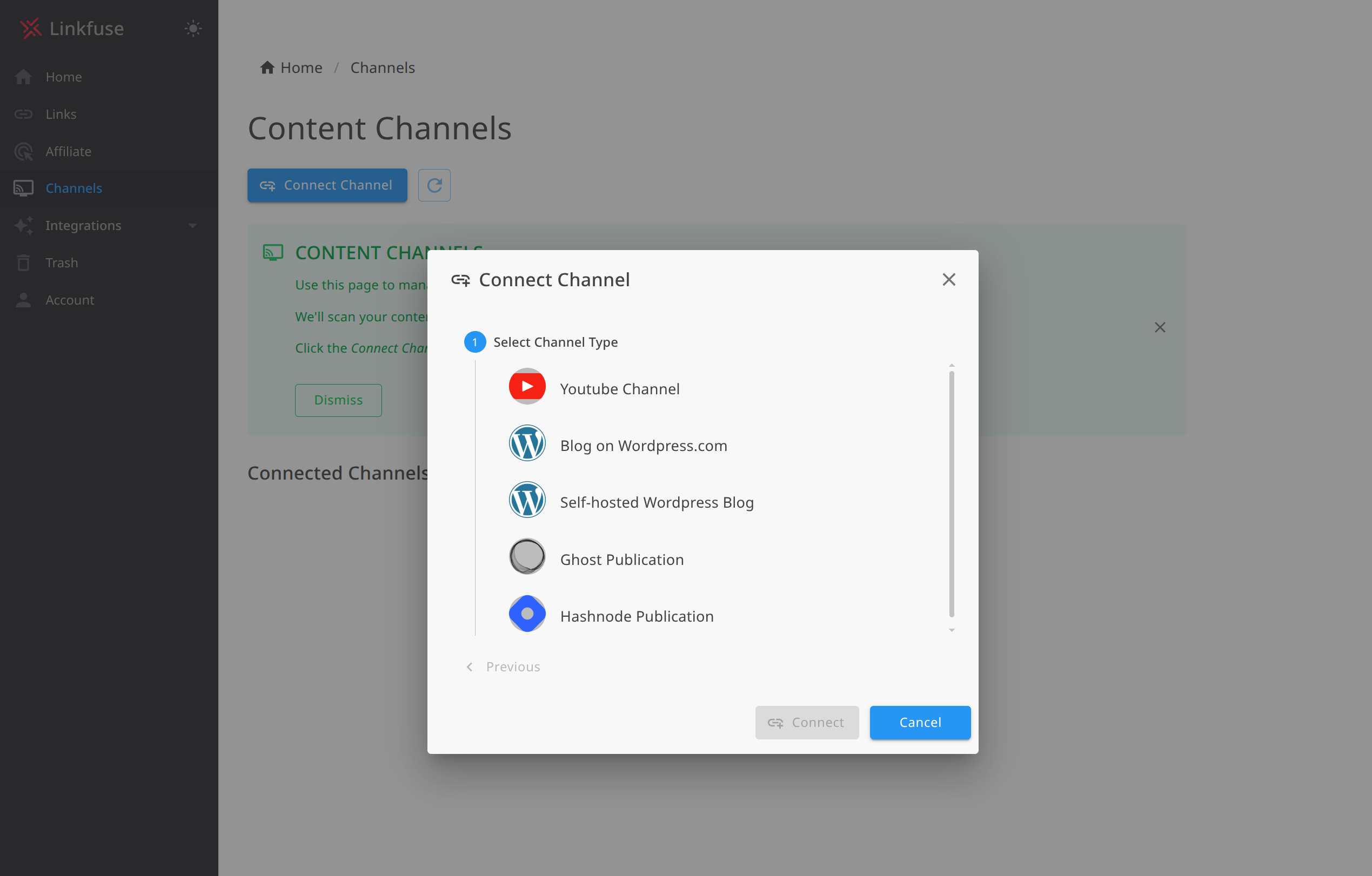
- Navigate to Channels → Add Channel
- Select Hashnode from the platform options
- Enter your publication URL (e.g.,
https://yourblog.hashnode.devor your custom domain) - Paste your Personal Access Token
- Click Connect
Linkfuse queries Hashnode's GraphQL API to verify the connection and begins scanning your publication.
Step 5: Enable Automatic Monitoring
Once connected, enable real-time webhook monitoring:
- In your Hashnode channel settings, find the Monitoring section
- Toggle Enable automatic monitoring to ON
- Linkfuse creates webhooks for
POST_PUBLISHEDandPOST_UPDATEDevents
With monitoring enabled, every new post and every edit triggers automatic link processing. Publish at midnight after a coding session? Links are converted before your first reader sees the post.
Step 6: Watch the Initial Scan
Linkfuse performs an initial scan of all your published posts:
- Every post's markdown is analyzed for Amazon affiliate links
- Eligible links are converted to localized Linkfuse links
- Your markdown structure and code blocks remain intact
- The activity log shows exactly what was processed
For a blog with 100 posts, the scan typically completes in a few minutes.
Step 7: Verify the Integration
To confirm everything works:
- Check the Channel activity log—posts should show "Updated X Links" status
- Open any post on your Hashnode blog
- Inspect an Amazon link—it should now be a Linkfuse short link
- Click it—you should land on your local Amazon store with your affiliate tag
- Use a VPN or ask an international colleague to test from another region
The beauty of Content Channels: you don't need to change how you write. Markdown links like [The Pragmatic Programmer](https://amazon.com/dp/B07VRS84D1) are automatically converted.
Writing Affiliate Content on Hashnode with Linkfuse
With the technical setup complete, let's talk about creating content that converts.
Link Placement Best Practices
Early mention: Include your first affiliate link in the introduction. Developers who already know what they want shouldn't scroll through your entire post.
Contextual links: The most effective affiliate links appear naturally in sentences:
I've been using the [Keychron K2](https://amazon.com/dp/B07YB32H52) for the
past year, and it's become my favorite keyboard for coding.
Multiple touchpoints: For longer posts, mention the product 2-3 times—introduction, detailed section, and conclusion.
Comparison tables: Developers love structured comparisons:
| Keyboard | Switch Type | Price | Link |
|----------|-------------|-------|------|
| Keychron K2 | Gateron Brown | $$ | [Check price](link) |
| HHKB Pro | Topre | $$$$ | [Check price](link) |
Content Formats That Convert
"Best X for Developers" posts
These rank well and convert consistently:
- "Best Mechanical Keyboards for Programmers"
- "Best Books for Learning [Language]"
- "Best Monitors for Coding"
Structure with a quick-pick summary, detailed reviews, and clear recommendations.
Setup and "Uses" posts
Developers love seeing other developers' setups:
- "My 2026 Development Setup"
- "Tools I Use for [Framework] Development"
Include photos if possible—setup posts with images get more engagement.
Book reviews and reading lists
Technical book recommendations convert well because:
- Developers trust other developers' opinions
- Books have high purchase intent (people searching for reviews are ready to buy)
- Programming books are often $40-60+, meaning decent commissions even at 4.5%
Tutorial posts with tool recommendations
When writing tutorials, naturally mention the tools you're using:
## Prerequisites

For this tutorial, you'll need:
- Node.js 18+
- A code editor (I use VS Code with the [Vim extension](link))
- The [O'Reilly TypeScript book](link) is helpful if you're new to TS
Building a "Uses" or "Gear" Page
Create a dedicated page listing your development setup. This becomes evergreen content you can link from multiple posts.
Structure by category:
- Hardware: Laptop, monitor, keyboard, mouse, desk
- Software: Editor, terminal, browser extensions
- Books: Currently reading, favorites by category
Update it periodically and mention it in relevant posts.
Advanced Hashnode + Linkfuse Features
The Content Channel Activity Log
Every link conversion is logged with full visibility:
- Post title for each processed article
- Action taken (e.g., "Updated 4 Links", "No eligible links found")
- Timestamp of when processing occurred
- Full audit trail of all changes
If something looks wrong, you can see exactly what happened and when.
Retroactive Optimization
This is where Content Channels shine for established Hashnode blogs. That "Best Programming Books of 2024" post you wrote two years ago? It's still getting search traffic, but every Amazon link points to amazon.com regardless of who's reading.
When you connect your Hashnode publication, Linkfuse scans your entire archive. Every published post, no matter how old, gets its affiliate links localized. Revenue you've been losing for years starts flowing immediately.
For a Hashnode blog with 150+ posts, this retroactive optimization alone can recover significant annual revenue.
Webhook-Based Real-Time Processing
Linkfuse uses Hashnode's native webhook system:
POST_PUBLISHED: New posts are processed within seconds of publicationPOST_UPDATED: Edited posts are re-scanned for new links
Your content is optimized before most readers see it. No manual triggers, no remembering to "sync" anything.
Markdown-Native Integration
Linkfuse processes your markdown directly, converting standard markdown links:
<!-- Before Linkfuse processing -->
Check out [The Pragmatic Programmer](https://amazon.com/dp/B07VRS84D1)

<!-- After Linkfuse processing -->
Check out [The Pragmatic Programmer](https://lnkf.us/abc123)
Your code blocks, formatting, and content structure remain completely intact.
Product Display Widgets (Optional Enhancement)
For high-value posts like gear roundups, Linkfuse's Product Displays let you embed professional product cards. First, add the embed script to your Hashnode publication's custom head:
<script src="https://app.linkfuse.net/js/embed.js" async></script>Then embed displays using Hashnode's HTML widget:
<script src="https://app.linkfuse.net/js/embed.js" data-id="YOUR_DISPLAY_ID" async></script>Product Displays are optional—the core Content Channel integration handles everything automatically.
Analytics and Optimization
Reading Your Linkfuse Dashboard
Key metrics for Hashnode bloggers:
- Clicks by country: See which regions engage most with your content
- Device breakdown: Developer audiences skew desktop, but mobile matters
- Top performing links: Which products resonate with your readers
- Click-through by post: Which articles drive the most affiliate interest
Geographic Insights
Developer traffic patterns can be surprising:
- India often represents 15-25% of traffic for English developer content
- Germany has a large, active developer community
- UK and Canada convert at high rates (English-speaking, Prime members)
- Japan is valuable for certain niches (keyboard enthusiasts, gaming)
Use these insights to tailor content. If German developers love your Neovim posts, consider more editor content.
Optimization Workflow
- Monthly: Review top-performing posts in Hashnode Analytics
- Monthly: Cross-reference with Linkfuse click data
- Quarterly: Update high-traffic posts with current product recommendations
- Quarterly: Create content targeting high-converting regions
Real Results: A Case Study
Background: Marcus runs a Hashnode blog about Rust programming and developer productivity. He's been publishing for two years with 120+ posts. Audience: 30,000 monthly visitors, 58% from outside the United States.
Before Linkfuse:
- International conversion rate: 0.3%
- Monthly international affiliate revenue: $85
- Two years of posts with US-only Amazon links
- No practical way to update existing content manually
After connecting Hashnode as a Content Channel:
- Initial scan processed all 120 posts in 8 minutes
- 215 Amazon links automatically converted
- International conversion rate jumped to 2.6%
- Monthly international affiliate revenue: $720
Key wins:
- Retroactive optimization: Two years of "Best Rust Books" posts now monetize globally
- Indian readers (his second-largest segment) finally convert—previously impossible with US-only links
- Zero workflow changes: He writes markdown exactly as before
- German traffic converts particularly well on his mechanical keyboard posts
Total revenue increase: 40% from international traffic—plus recovered revenue from his entire archive.
Alternative Approaches
For completeness, here are other options and their limitations:
Manual Multi-Region Links
Approach: List separate links for each Amazon region in your markdown.
Problems for Hashnode users:
- Clutters your clean markdown
- Readers often click the wrong link
- Doesn't scale with a growing post archive
- Tedious to maintain across 100+ posts
Amazon OneLink
Approach: Amazon's official (free) localization tool.
Problems for Hashnode users:
- Blocked by many ad blockers (developers use these heavily)
- Requires JavaScript—not ideal for markdown-native workflows
- Poor product matching—often sends to search results
- No mobile deep linking
- Limited analytics
Other Services
| Service | Strengths | Hashnode-Specific Issues |
|---|---|---|
| Geniuslink | Established, reliable | No native Hashnode integration—manual link creation required |
| Skimlinks | Automatic conversion | Heavy JavaScript, not markdown-native |
| VigLink | Broad retailer network | Auto-insertion doesn't fit developer content style |
Linkfuse's native Hashnode Content Channel integration is the key differentiator. Other services require manual link creation. Linkfuse connects to Hashnode's GraphQL API, scans your entire publication, and converts links automatically—including your entire archive.
Troubleshooting
Hashnode Content Channel Issues
Invalid Personal Access Token Error
If Linkfuse can't connect:
- Verify the token hasn't expired or been revoked
- Ensure you copied the entire token without extra spaces
- Generate a new token if needed (Hashnode Developer Settings)
Publication Not Found
If your publication isn't detected:
- Verify the URL is correct (include
https://) - Check you're using the right URL (custom domain vs.
hashnode.devsubdomain) - Ensure your PAT has access to the specified publication
Webhook Creation Failures
If monitoring can't be enabled:
- Verify you have owner or admin permissions on the publication
- Check if Hashnode has webhook limits for your plan tier
- Review Hashnode's webhook settings for conflicts
Links Not Converting
If posts are processed but links aren't converting:
- Ensure posts are published (drafts aren't processed)
- Verify affiliate programs are configured in Linkfuse (Settings → Affiliate Tags)
- Check that markdown links use standard format:
[text](url) - Confirm links point to Amazon (not shortened or redirect URLs)
New Posts Not Processing Automatically
If automatic monitoring isn't working:
- Verify webhooks are enabled in your channel settings
- Check Hashnode's webhook delivery logs if available
- Try manually triggering a scan from Linkfuse
General Issues
Links not redirecting properly
- Clear your browser cache
- Verify affiliate tags are entered correctly in Linkfuse
- Test in an incognito window
Analytics not showing clicks
- Clicks can take up to an hour to appear
- Ad blockers may prevent some tracking
- Verify the link is a Linkfuse link (check for
lnkf.us)
Getting Started Today
Your Hashnode blog already attracts developers from around the world. The only question is whether you'll monetize them.
Here's your action plan:
- Today: Check your Hashnode analytics for international traffic percentage
- This week: Sign up for Linkfuse and add your regional Amazon affiliate tags
- This week: Generate a Hashnode PAT and connect your publication
- Watch: Linkfuse scans your entire archive and converts every eligible link automatically
- Next month: Compare your international conversion rates
The integration takes less than 15 minutes. Your entire content library—past, present, and future—is optimized automatically. No manual link creation. No workflow changes. No going back through old posts.
Sign up for Linkfuse and see the difference proper link localization makes.
Have questions about setting up Linkfuse with your Hashnode blog? Check our Knowledge Base or reach out to support—we help developer bloggers get the most from their affiliate content.