
Linkfuse n8n Integration
Linkfuse now offers official integration with n8n, the popular open-source workflow automation platform. The n8n-nodes-linkfuse package enables content creators and affiliate marketers to programmatically manage localized Amazon affiliate links, automate content optimization, and build sophisticated workflows that maximize international affiliate revenue.
What is n8n?
n8n (pronounced "n-eight-n") is a fair-code licensed workflow automation platform that combines visual workflow building with the flexibility of custom code. With over 400 native integrations and the ability to connect to any REST API, n8n enables technical teams to automate complex business processes.
n8n features include:
- Visual Workflow Builder: Drag-and-drop interface for creating automations
- Self-Hosting Option: Deploy on your own infrastructure for complete data control
- 400+ Integrations: Connect to popular services and APIs
- AI Workflow Support: Build AI-powered automations with LangChain integration
- Open Source: Transparent development with active community contributions
Installing the Linkfuse n8n Node
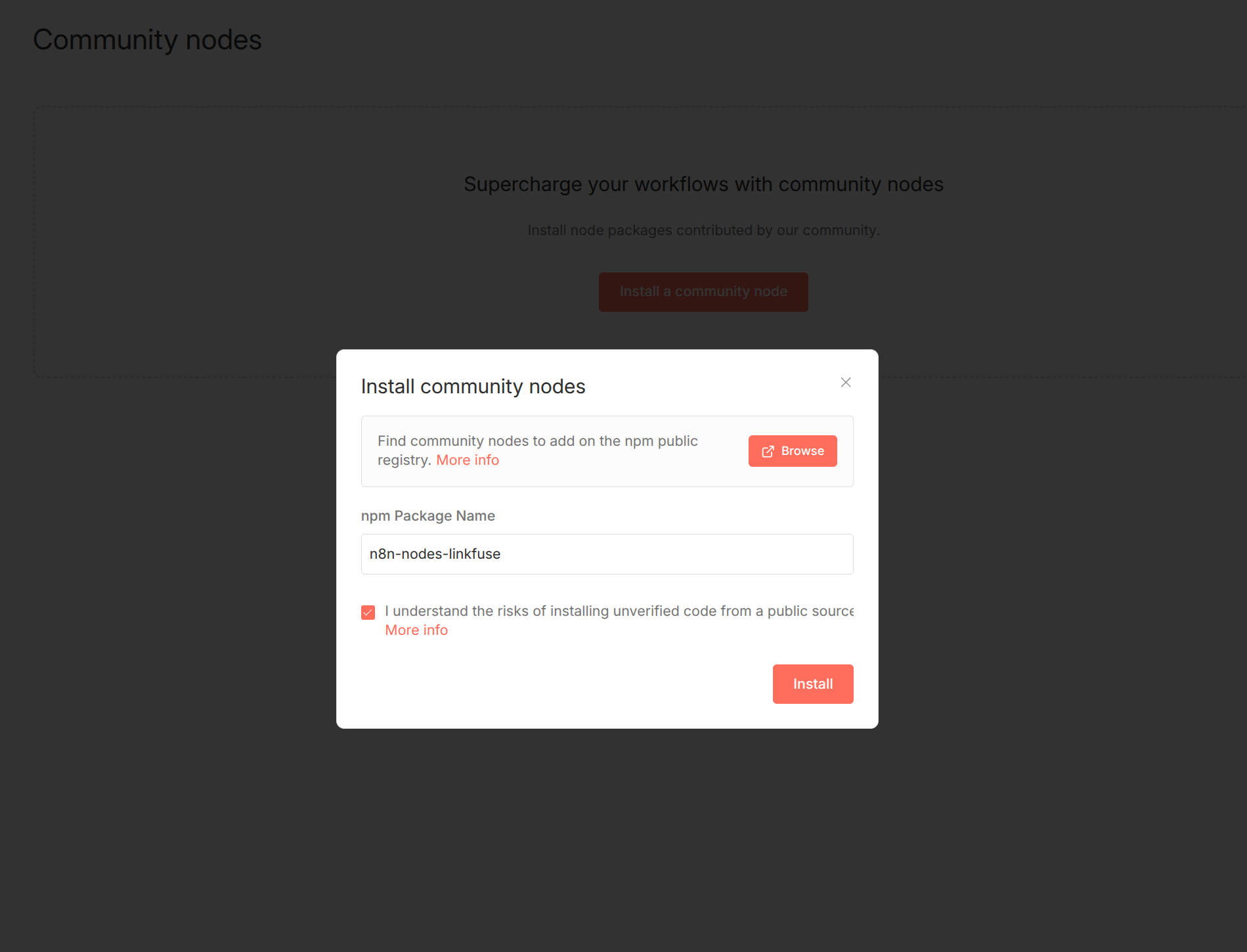
The Linkfuse integration is available as a community node package on npm. To install n8n-nodes-linkfuse, follow the standard n8n community node installation process:
- Open your n8n instance
- Navigate to Settings → Community Nodes
- Search for
n8n-nodes-linkfuse - Click Install
For self-hosted n8n installations, you can also install via npm:
npm install n8n-nodes-linkfuseAfter installation, restart your n8n instance to load the new node.
Open Source and Transparency
The Linkfuse n8n community node is fully open source. The complete source code is available for inspection at github.com/oliverw/n8n-nodes-linkfuse.
Linkfuse n8n Node Features
The Linkfuse node for n8n provides comprehensive API access to all Linkfuse functionality. This enables affiliate marketers to build automated workflows for link management and content optimization.
Link Management Operations
The Linkfuse n8n node supports full CRUD (Create, Read, Update, Delete) operations for affiliate links:
- Create Link: Generate new localized Linkfuse affiliate links programmatically
- Get Link: Retrieve link details and analytics data
- Update Link: Modify existing link properties and settings
- Delete Link: Remove links that are no longer needed
- List Links: Fetch all links or filter by various criteria
Content Channel Integration
The Linkfuse n8n integration enables automation of content channel features:
- YouTube Channel Management: Connect, disconnect, and manage YouTube channel integrations
- WordPress Blog Management: Connect and manage WordPress blog integrations
- Content Scanning: Trigger scans of your YouTube videos or blog posts to identify affiliate link opportunities
- Link Optimization: Automatically convert eligible product links to optimized Linkfuse links
- Re-scan Triggers: Programmatically trigger re-scans when you publish new content
Workflow Automation Examples
The Linkfuse n8n integration enables a wide variety of automation scenarios for affiliate marketers and content creators.
Automated New Content Optimization
Create a workflow that automatically optimizes affiliate links whenever you publish new content:
- Trigger: Webhook from your CMS or YouTube notification
- Action: Trigger Linkfuse content scan for the new post or video
- Result: All eligible Amazon links are automatically converted to localized Linkfuse links
Bulk Link Creation from Spreadsheets
Automate link creation for product roundups and comparison articles:
- Trigger: New row added to Google Sheets or Airtable
- Action: Create Linkfuse link for each Amazon product URL
- Action: Update spreadsheet with generated Linkfuse short links
Scheduled Content Re-optimization
Ensure older content stays optimized with periodic re-scans:
- Trigger: Scheduled cron trigger (weekly or monthly)
- Action: Fetch list of connected YouTube channels or blogs
- Action: Trigger re-scan for each channel
- Result: New products and updated links are automatically optimized
Analytics Reporting Automation
Build automated reporting workflows for affiliate performance:
- Trigger: Scheduled trigger (daily or weekly)
- Action: Fetch link analytics from Linkfuse
- Action: Compile performance data and send via email or Slack
- Result: Regular performance reports without manual effort
Multi-Platform Content Syndication
Optimize links across multiple content platforms simultaneously:
- Trigger: New blog post published
- Action: Create Linkfuse links for all Amazon products mentioned
- Action: Update blog post with Linkfuse links
- Action: Create social media posts with optimized links
- Result: Consistent localized links across all platforms
Why Automate Affiliate Link Management?
Automating affiliate link management with Linkfuse and n8n provides significant benefits for content creators and affiliate marketers.
Time Savings
Manual link management is tedious and error-prone. Automation eliminates repetitive tasks like creating links, updating old content, and tracking performance across multiple platforms.
Consistency
Automated workflows ensure every piece of content uses optimized, localized affiliate links. No more forgotten links or inconsistent tracking.
Scalability
As your content library grows, manual link management becomes unsustainable. Automation scales effortlessly to handle hundreds or thousands of pieces of content.
International Revenue Optimization
Linkfuse's automatic Amazon localization ensures international visitors land on their regional Amazon store. Research indicates that 85% of shoppers leave Amazon if they don't land in the store for their region. Automated localization maximizes conversion rates globally.
Real-Time Optimization
Automation enables real-time responses to new content, price changes, or product availability updates. Your affiliate strategy stays current without constant manual monitoring.
Getting Started with Linkfuse and n8n
To start automating your affiliate link management with Linkfuse and n8n:
- Create a Linkfuse Account: Sign up at linkfuse.net (free, no credit card required)
- Set Up Amazon Associates: Register for Amazon Associates programs in your target regions
- Configure Linkfuse: Add your affiliate tracking IDs to your Linkfuse account
- Install n8n: Deploy n8n via Docker, npm, or use n8n Cloud
- Install the Linkfuse Node: Add
n8n-nodes-linkfuseto your n8n instance - Build Your First Workflow: Start with a simple link creation workflow and expand from there
Linkfuse API Access
The Linkfuse n8n node uses the Linkfuse API to perform all operations. API credentials can be generated from your Linkfuse dashboard. The API supports:
- RESTful endpoints for all link management operations
- Authentication via API key
- Rate limiting appropriate for automation workloads
- Comprehensive error handling and status codes
Use Cases by Creator Type
YouTube Content Creators
YouTube creators can automate optimization of product links in video descriptions. The Linkfuse YouTube channel integration scans video descriptions for Amazon links and automatically converts them to localized Linkfuse links. With n8n automation, this process can be triggered automatically whenever new videos are published.
Bloggers and Website Owners
Bloggers using WordPress or other content management systems can automate affiliate link optimization across their entire content library. The Linkfuse WordPress integration scans posts for eligible links, and n8n workflows can trigger re-scans on a schedule or when specific events occur.
Affiliate Marketing Agencies
Agencies managing multiple client accounts can build n8n workflows that handle link management at scale. Create links, monitor performance, and generate reports across multiple Linkfuse accounts with centralized automation.
E-commerce Review Sites
Product review sites with large catalogs can automate link creation and maintenance. As products are added or updated, n8n workflows ensure all affiliate links are current and properly localized.
Technical Requirements
To use the Linkfuse n8n integration, you need:
- n8n: Version 0.200.0 or later (self-hosted or n8n Cloud)
- Node.js: Version 18 or later (for self-hosted n8n)
- Linkfuse Account: Free account at linkfuse.net
- Linkfuse API Key: Generated from your Linkfuse dashboard
Comparison: Manual vs Automated Link Management
| Aspect | Manual Management | Automated with Linkfuse + n8n |
|---|---|---|
| Time per link | 2-5 minutes | Seconds (automated) |
| Consistency | Variable | 100% consistent |
| Scalability | Limited by time | Unlimited |
| International optimization | Often forgotten | Automatic |
| Error rate | Human error prone | Minimal |
| Content re-optimization | Rarely done | Scheduled automatically |
| Reporting | Manual compilation | Automated delivery |
Conclusion
The Linkfuse n8n integration brings powerful automation capabilities to affiliate link management. By combining Linkfuse's automatic Amazon localization with n8n's flexible workflow automation, content creators can save time, improve consistency, and maximize international affiliate revenue.
Whether you're a YouTube creator, blogger, or affiliate marketing agency, automating your link management workflow enables you to focus on creating content while your affiliate infrastructure runs on autopilot.
Get started today by installing n8n-nodes-linkfuse from npm and building your first automated affiliate workflow.