
Complete Guide to Amazon Affiliates on Webflow: Setup, Automation, and Optimization
Webflow has become the platform of choice for designers, agencies, and creators who want pixel-perfect websites with a powerful CMS—all without writing code. But Webflow's visual polish and global reach create a monetization problem most site owners overlook: your Amazon affiliate links only work for one country, and your international visitors are bouncing without buying.
If you're running a Webflow site with Amazon affiliate links—product reviews, resource pages, curated collections—you're almost certainly leaving money on the table. This guide shows you exactly why, and how to fix it.
Why Webflow Is Perfect for Affiliate Content
Webflow has earned its place as the premier visual web platform for good reasons.
Design freedom builds trust. Webflow gives you complete creative control without code. Your product recommendations live inside beautifully designed pages that feel editorial, not spammy. When a review page looks as polished as a magazine spread, readers trust your recommendations more.
CMS-powered content scales. Webflow's CMS lets you build dynamic collections—product reviews, comparison pages, resource libraries—that scale effortlessly. Add a new review to your collection and it automatically appears on category pages, homepage features, and RSS feeds.
Speed is built in. Webflow sites are hosted on a global CDN with automatic image optimization. Fast page loads mean higher engagement and better conversion rates on your affiliate content.
SEO fundamentals are handled. Webflow generates clean HTML, manages meta tags, creates sitemaps, and handles canonical URLs. You focus on creating content; Webflow handles the technical SEO foundation.
No plugin dependencies. Unlike WordPress, Webflow doesn't require third-party plugins for basic functionality. Fewer dependencies means fewer things that break and faster load times.
Affiliate Niches That Thrive on Webflow
Webflow attracts a design-savvy audience, and certain content categories perform exceptionally well:
| Niche | Why Webflow Works | Revenue Potential |
|---|---|---|
| Design tools & equipment | Visual portfolio showcases recommendations beautifully | Very high (premium products) |
| Home & lifestyle | Stunning product photography, curated collections | High (broad product range) |
| Photography & video gear | Portfolio-quality imagery sells gear naturally | High (high-value products) |
| Tech & productivity | Detailed reviews with custom layouts | Very high |
| Fashion & accessories | Lookbook-style pages with affiliate links | Moderate-high |
| Fitness & wellness | Beautiful landing pages for product roundups | Moderate-high |
Webflow sites attract an international, design-conscious audience. Which brings us to the problem.
The International Revenue Problem
Webflow's global CDN and strong SEO attract visitors from everywhere. Your analytics probably show significant traffic from the UK, Germany, Canada, Australia, and other markets. That's normally a good thing—until you realize what happens when those visitors click your affiliate links.
A Real Scenario
Let's model a Webflow site about home office design and productivity equipment:
- Monthly visitors: 45,000
- Geographic breakdown: 42% US, 16% UK, 11% Germany, 9% Canada, 22% other international
- Affiliate link click rate: 4.5%
- International clicks: 1,175 per month (58% of traffic × 2,025 clicks)
When Sophia in London clicks your link to that standing desk after browsing your beautifully designed office setup page:
- She lands on amazon.com (not amazon.co.uk)
- She sees the price in USD—$899 requires mental currency conversion
- Shipping to the UK shows $150+ or "item not available for delivery"
- She closes the tab and searches on amazon.co.uk instead
- She buys the desk. You earn nothing.
The revenue math is brutal:
With proper localization (3% conversion rate):
- 1,175 international clicks × 3% = 35 conversions
- Average commission: $18
- Monthly international revenue: $630
What Webflow site owners typically see:
- 1,175 international clicks × 0.4% (frustrated bounces) = 4.7 conversions
- Actual monthly international revenue: $85
You're losing $545 per month—or over $6,500 per year—from international traffic that already exists.
Why This Matters More on Webflow
The irony is that Webflow's strengths amplify this problem:
- Webflow's global CDN means your pages load fast everywhere—attracting worldwide traffic
- Webflow's design quality attracts discerning visitors who expect seamless experiences
- Webflow's CMS makes it easy to create content-rich sites that rank globally
- Webflow sites are often portfolio-style or editorial—audiences that skew international
You've built a beautifully designed site that attracts visitors from around the world. Your affiliate links don't follow through.
Getting Started with Amazon Associates
Before we fix the localization problem, you need affiliate accounts with multiple Amazon programs.
Quick Signup Walkthrough
Amazon US (amazon.com/associates)
- Sign in with your Amazon account
- Enter your website URL (your Webflow site)
- Describe your site and traffic sources
- Create your first affiliate tag (e.g.,
yoursite-20) - Choose your payment method
Amazon UK (affiliate-program.amazon.co.uk)
Repeat the process for the UK program. Your tag will look different (e.g., yoursite-21).
Amazon Germany (partnernet.amazon.de) Same process. German tags use another format.
Continue for any regions where you have significant traffic: Canada, France, Italy, Spain, Japan, Australia.
Amazon's Terms of Service for Webflow Sites
A few rules to keep in mind:
- Always disclose affiliate relationships (add a notice to your footer or individual pages)
- Don't use affiliate links in emails directly (link to your site content instead)
- Don't manipulate prices or availability information
- Don't use Amazon's trademark in your domain name
Webflow's editorial design approach naturally aligns with Amazon's guidelines—you're recommending products through curated, designed content, not building a thin affiliate site.
The Manual Nightmare
Now you have six different affiliate accounts. For each product you recommend, you need to:
- Find the product on amazon.com and copy the link with your US tag
- Search for the same product on amazon.co.uk and copy that link
- Repeat for amazon.de, amazon.ca, amazon.fr...
- Display all six links to your visitors somehow
- Hope they click the right one
This is tedious, error-prone, and ruins your carefully designed layouts. There's a better way.
Linkfuse + Webflow Integration
Linkfuse solves the international affiliate problem through Content Channels—a direct integration with Webflow that automatically scans your CMS content and converts every Amazon link to a localized, tracked affiliate link. No manual link creation. No workflow changes. Connect once, and Linkfuse handles every CMS item you've published and every item you'll publish in the future.
Why Linkfuse Works Perfectly with Webflow
Webflow is a first-class citizen in Linkfuse's Content Channel system. The integration connects directly to Webflow's Site API, which means:
- Automatic scanning: Linkfuse scans your Webflow CMS collections—every published item—and identifies Amazon affiliate links
- Automatic conversion: Those links are replaced with localized Linkfuse links that route visitors to their regional Amazon store
- Real-time webhooks: When you publish or edit a CMS item, Webflow notifies Linkfuse via webhooks. Your new content is processed within seconds
- Zero workflow changes: Keep designing and publishing exactly as you do now. Use regular Amazon links in your CMS content. Linkfuse converts them automatically
- Visual-first workflow: The integration works behind the scenes—your Webflow Designer workflow is completely untouched
- CMS collection support: Choose which CMS collections to monitor (blog posts, product reviews, resource pages, or any collection)
This is the critical difference from other solutions: you don't need to manually create Linkfuse links for each product. You don't need to remember a special URL format. Design your pages, add Amazon links to CMS content, publish. Linkfuse handles the rest.
Complete Setup Walkthrough
Step 1: Create Your Linkfuse Account
Visit Linkfuse's sign-up page and create your account.
Step 2: Add Your Amazon Affiliate Tags
In your Linkfuse dashboard, navigate to Settings → Affiliate Tags. Add your regional Amazon affiliate IDs:
| Region | Example Tag Format |
|---|---|
| United States | yoursite-20 |
| United Kingdom | yoursite-21 |
| Germany | yoursite-21 |
| Canada | yoursite-20 |
| France | yoursite-21 |
Linkfuse will automatically use the correct tag when redirecting visitors to their regional store.
Step 3: Generate a Site API Token in Webflow
Linkfuse connects to your Webflow site using a Site API token:
- Log in to your Webflow account and open your site's dashboard
- Navigate to Site Settings
- Scroll down to the "Apps & Integrations" section
- Click "Generate API token"
- Set the following permissions:
- CMS: Read and Write
- Sites: Read only
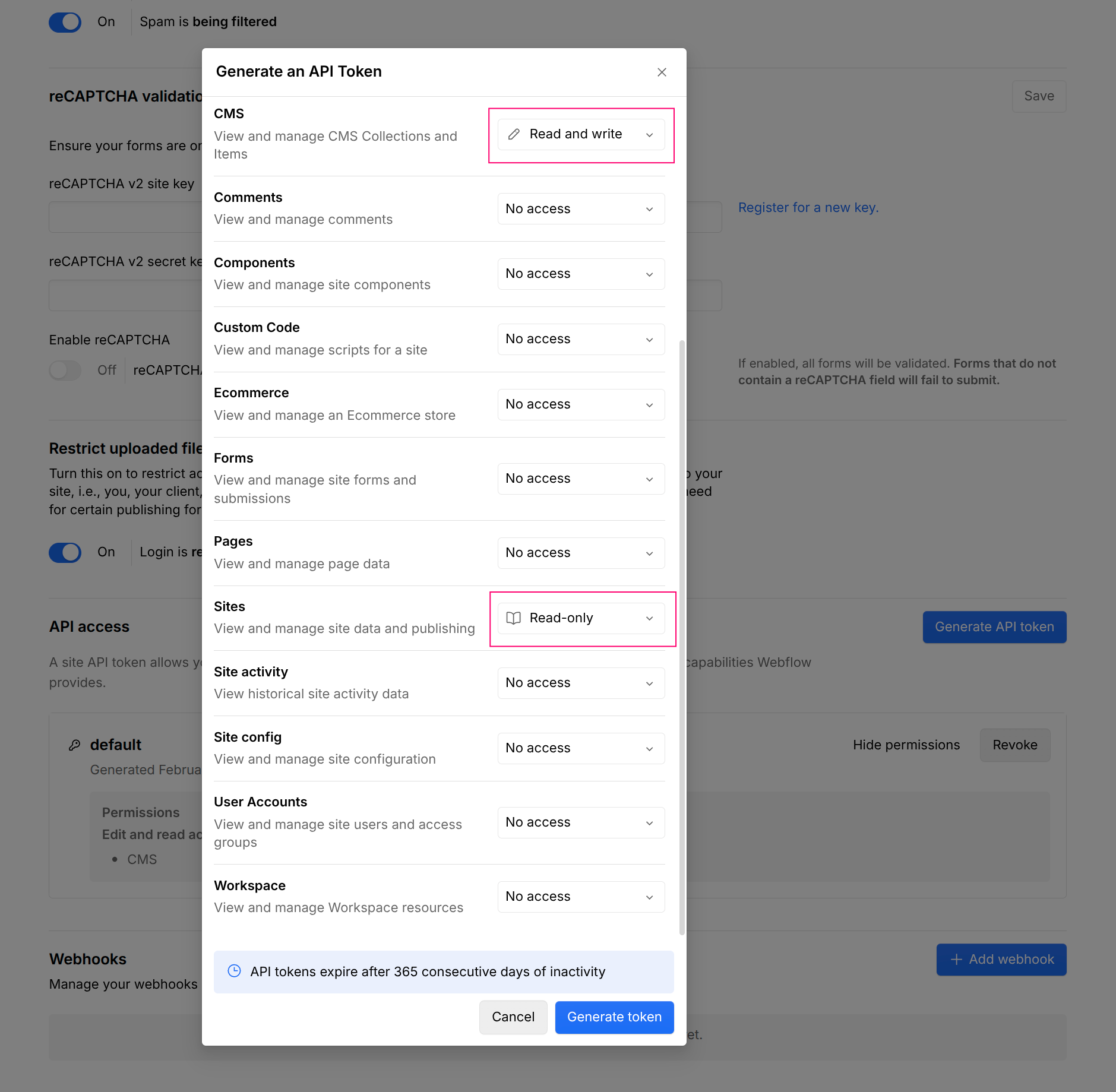
- Copy the generated token immediately
Important: Store this token securely. It provides API access to your Webflow site's CMS content and cannot be retrieved again after you leave the page.
Step 4: Connect Webflow as a Content Channel
Back in Linkfuse:
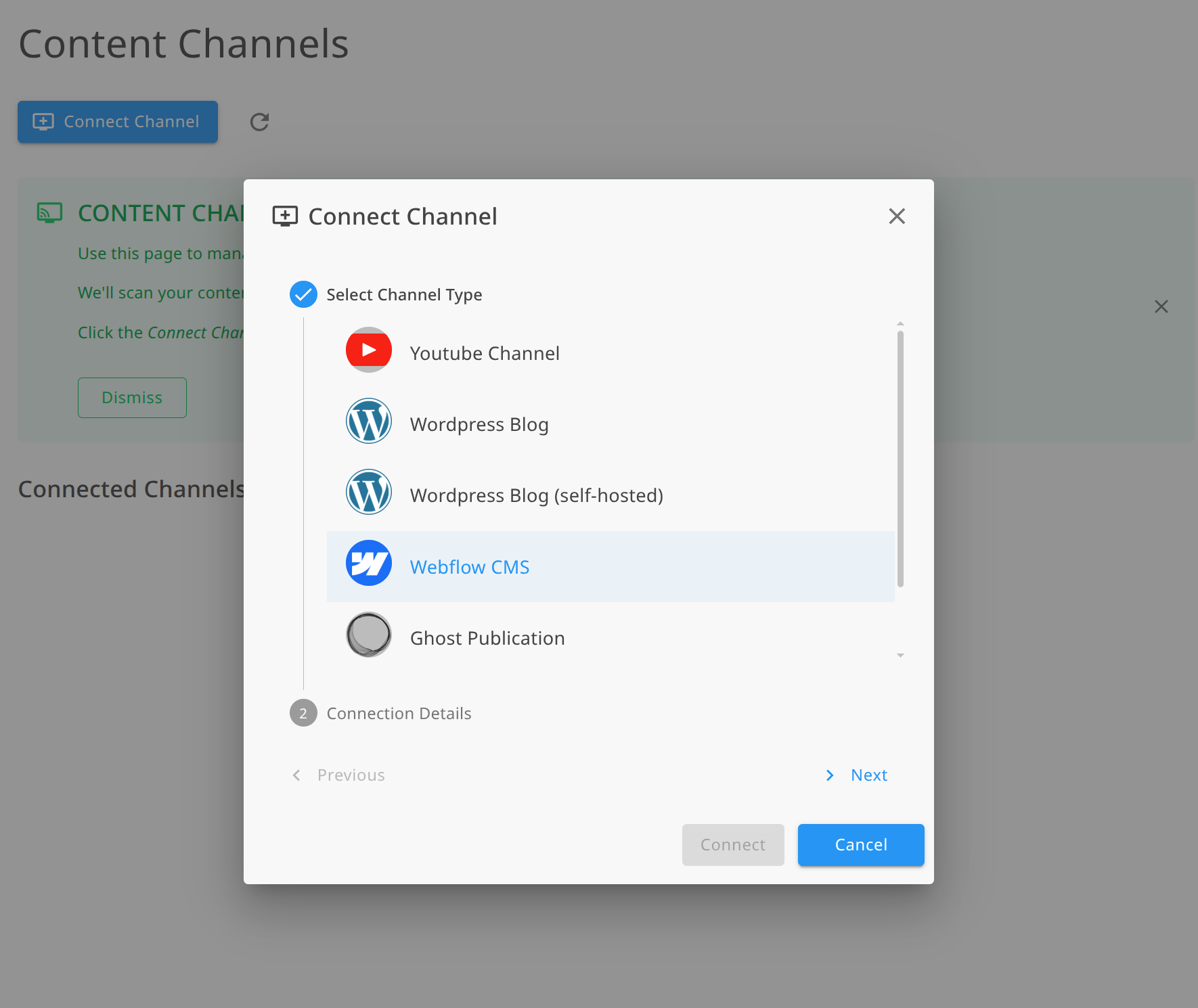
- Navigate to Channels → Add Channel
- Select Webflow from the platform options
- Paste your Site API token into the authentication field
- Click "Load Sites" to retrieve your Webflow sites
- Select your site from the list
- Choose the CMS collection to monitor (e.g., "Blog Posts", "Product Reviews", or any CMS collection containing affiliate links)
- Click Connect
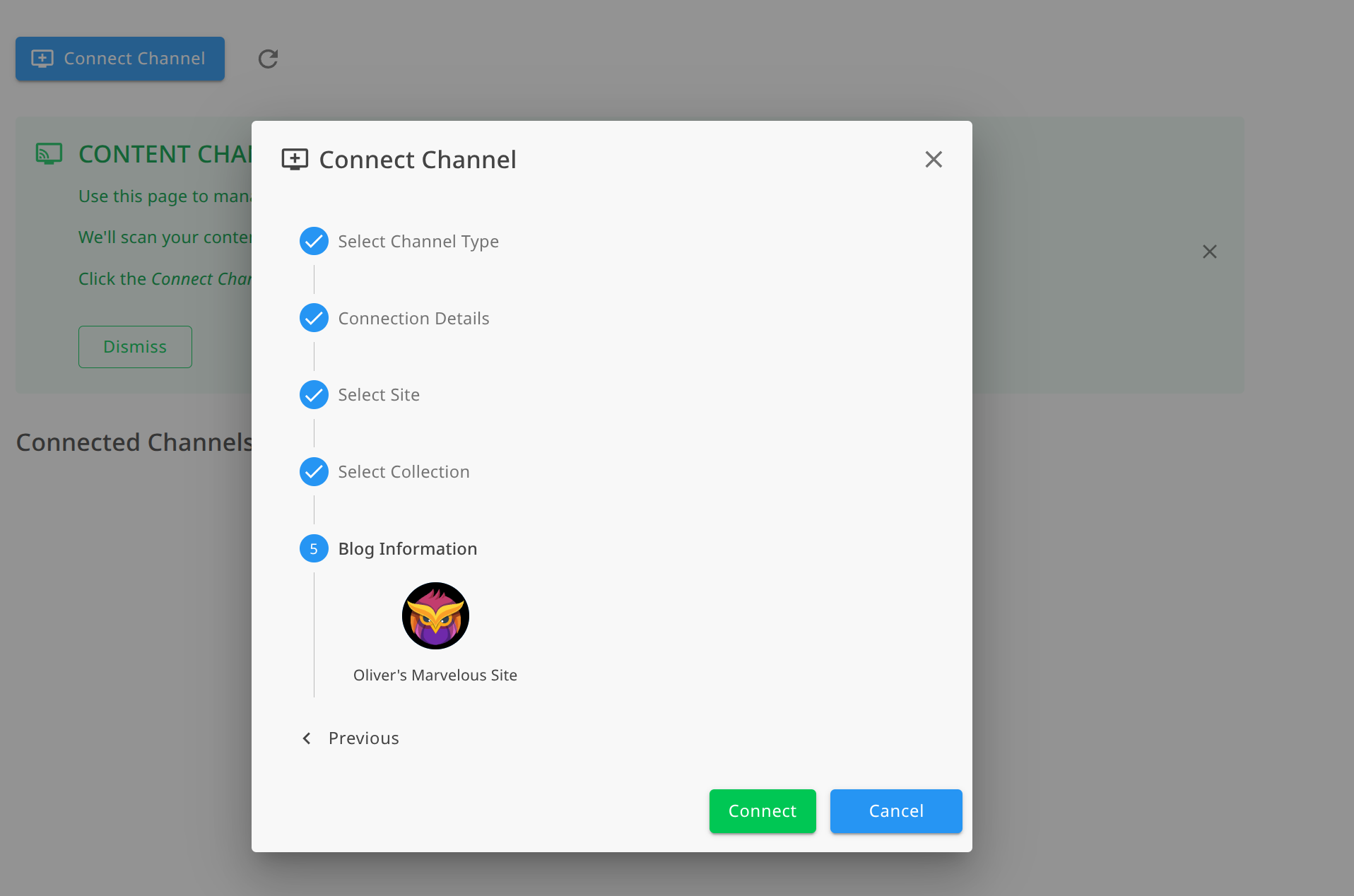
Linkfuse verifies the connection and immediately begins scanning your CMS content. No site URL is needed—everything is retrieved from the API token.
Step 5: Perform an Initial Scan
You may want to perform an initial scan of all your published CMS items:
- Every item in your selected collection is analyzed for Amazon affiliate links
- Eligible links are converted to localized Linkfuse links
- Your content structure and formatting remain intact
- The activity log shows exactly what was processed
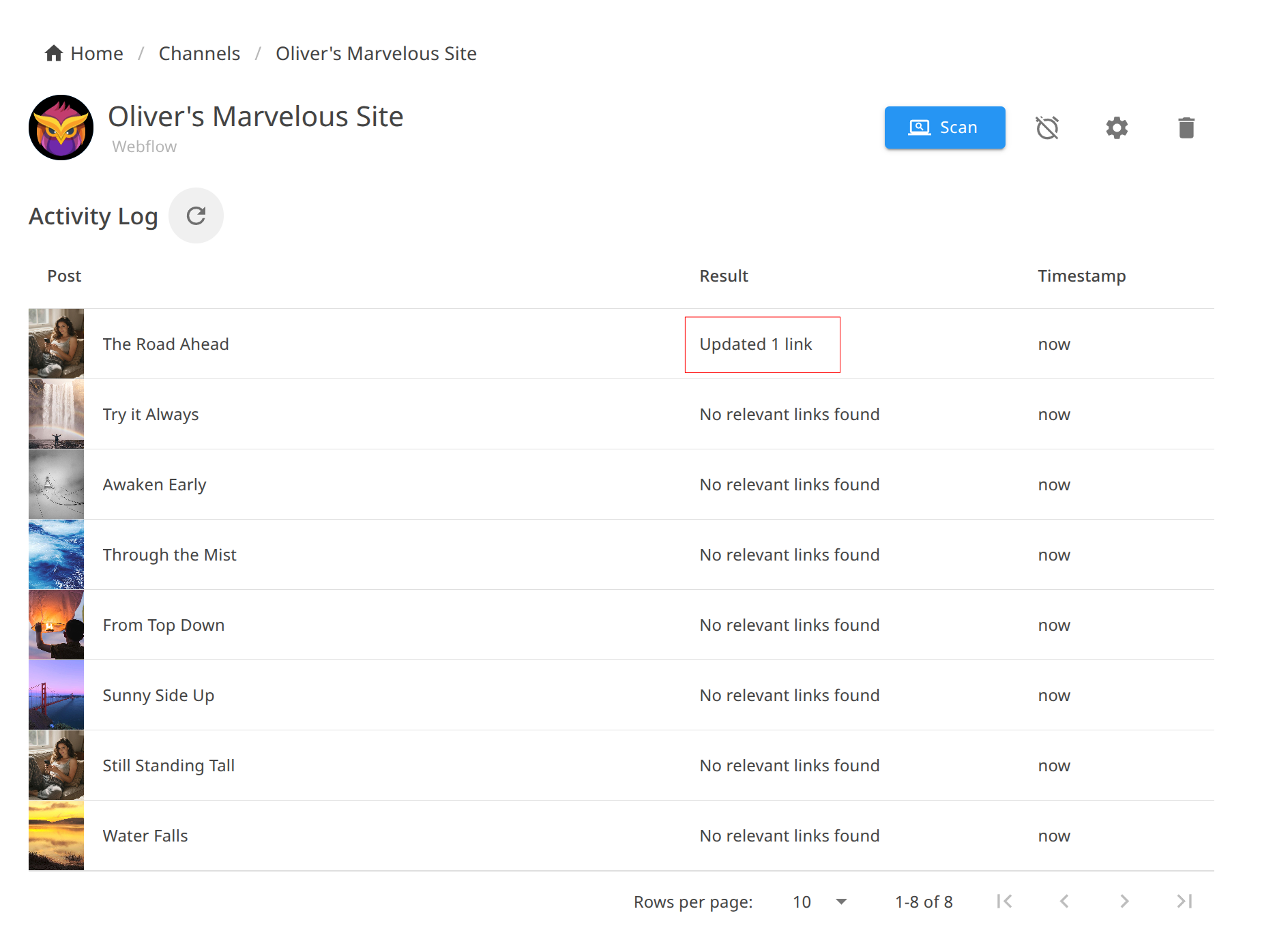
You can monitor progress in your Linkfuse dashboard. For a site with 150 CMS items, the scan typically completes in a few minutes.
Step 6: Enable Automatic Monitoring
Once connected, enable real-time monitoring:
- In your Webflow channel settings, find the Monitoring section
- Toggle Enable automatic monitoring to ON
- Linkfuse creates webhooks to listen for CMS content changes
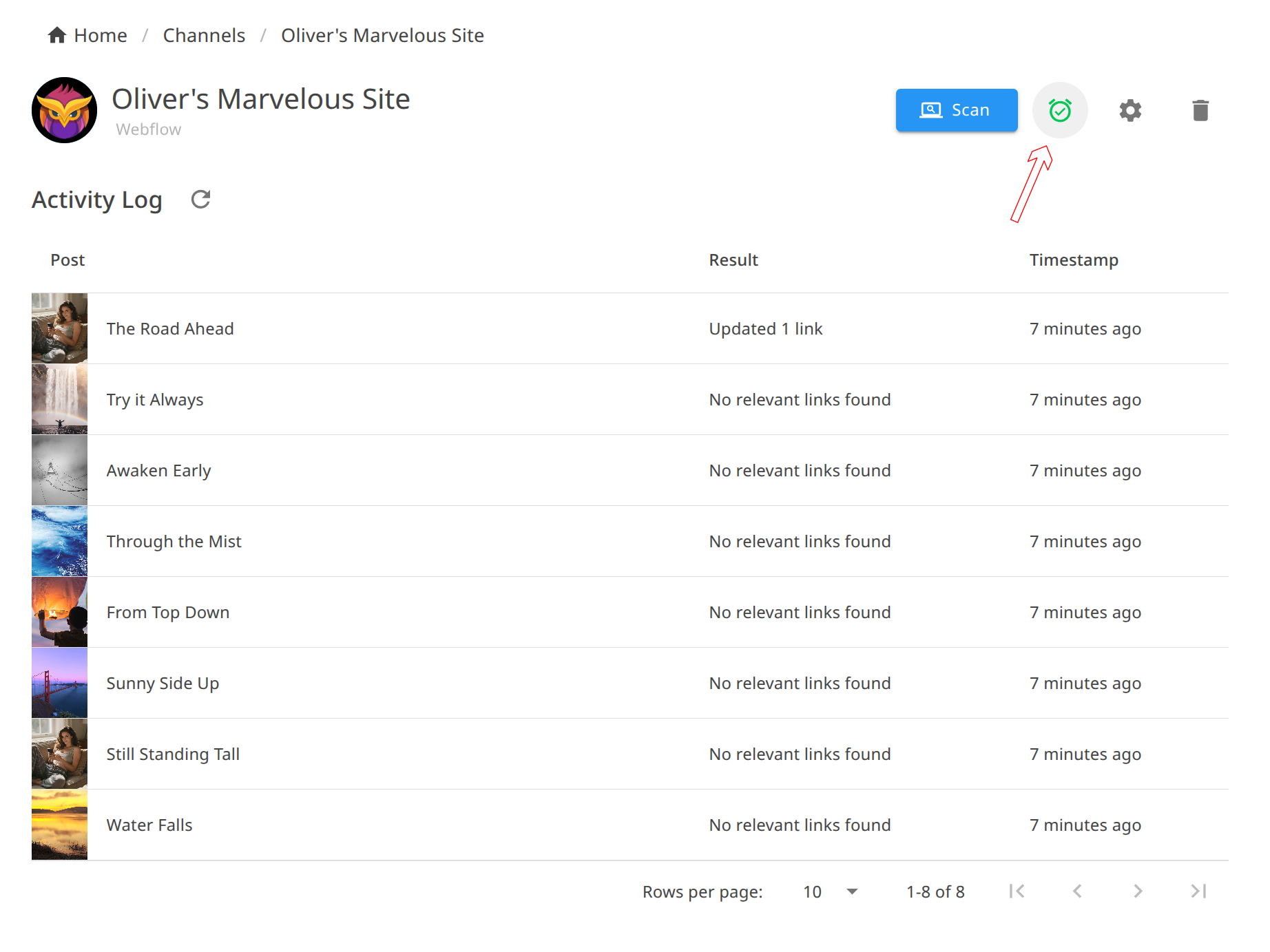
With monitoring enabled, every new CMS item and every edit triggers automatic link processing. Publish a product review at 3 AM? Links are converted immediately. Update an old roundup with a new product? That link is processed without any manual intervention.
Step 7: Verify the Integration
To confirm everything works:
- Check the Channel activity log—you should see your CMS items listed with "Updated X Links" status
- Open any page on your Webflow site that contains affiliate links
- Inspect an Amazon link—it should now be a Linkfuse short link
- Click it—you should land on your local Amazon store with your affiliate tag
- Use a VPN to test from another country, or ask an international friend to try
The beauty of Content Channels: you don't need to do anything special going forward. Design pages, add CMS content with Amazon links, publish. Linkfuse handles localization automatically.
Creating Affiliate Content in Webflow with Linkfuse
With the technical setup complete, let's talk about creating content that converts.
Link Placement Best Practices
Early mention: Include your first affiliate link within the opening section. Visitors who already know what they want shouldn't have to scroll through your entire page.
Contextual links: The most effective affiliate links appear naturally within your content: "I've been using the Sony WH-1000XM5 daily for the past six months."
Multiple touchpoints: Repeat the link opportunity 2-3 times in longer content—beginning, middle, and conclusion. Different visitors reach buying readiness at different points.
Comparison sections: When comparing products, link each product name. Visitors often click to check current prices.
Leveraging Webflow's CMS for Affiliate Content
Webflow's CMS is uniquely powerful for affiliate content:
Product Review Collections
Create a dedicated CMS collection for product reviews with fields like:
- Product name
- Category
- Rating
- Pros/Cons (rich text)
- Review body (rich text with affiliate links)
- Product image
Then design collection pages and listing templates that showcase reviews beautifully. When you add a new review, it automatically appears across your site.
Comparison Tables with CMS
Use Webflow's CMS to power dynamic comparison tables. Create a collection for products with fields for specs, pricing tier, and affiliate links. Visitors can browse structured comparisons while every product links to its localized Amazon page.
Resource Library Pages
Build a curated "/resources" or "/gear" page powered by CMS collections. Group products by category with custom-designed cards. This becomes evergreen content you can reference from blog posts and share on social media.
Content Formats That Convert on Webflow
"Best Of" Roundup Pages
Webflow's design flexibility makes roundup pages shine:
- Custom layouts with product images, specs, and recommendations
- Visual comparison grids that look editorial, not templated
- CTA buttons styled to match your brand
Setup and "Uses" Pages
Showcase your personal setup or workspace:
- "My 2026 Home Office Setup"
- "Tools I Use Every Day"
- "Photography Gear Guide"
Webflow lets you design these as visually stunning portfolio-style pages with affiliate links woven throughout.
In-Depth Reviews
Long-form CMS blog posts with detailed product reviews:
- Hero images and product photography
- Structured pros/cons sections
- Clear purchase CTAs styled with Webflow's design tools
Gift Guides and Seasonal Content
Webflow's design capabilities make seasonal gift guides particularly effective:
- Visually categorized product grids
- Price-range filtering with CMS categories
- Festive, on-brand design that encourages browsing
Advanced Webflow + Linkfuse Features
The Content Channel Activity Log
Every link conversion is logged, giving you full visibility into what Linkfuse has processed. The activity log shows:
- CMS item title for each processed piece of content
- Action taken (e.g., "Updated 3 Links", "No eligible links found")
- Timestamp of when processing occurred
- Full audit trail of all changes
This transparency lets you verify that links are being converted correctly and track optimization progress across your entire content library.
Retroactive Optimization
This is where Content Channels shine for established Webflow sites. That product roundup you published two years ago? It's still getting search traffic, but its Amazon links point to amazon.com for everyone.
When you connect your Webflow site, Linkfuse doesn't just process new content—it scans your entire CMS collection. Every published item, no matter how old, gets its affiliate links localized. Revenue you've been losing for years starts flowing immediately.
For a Webflow site with 200+ CMS items, this retroactive optimization alone can represent thousands of dollars in recovered annual revenue.
Webhook-Based Real-Time Processing
Linkfuse uses Webflow's native webhook system for instant processing:
- New CMS items are processed within seconds of publication
- Updated items are re-scanned for new or changed links
Your content is optimized before most visitors see it. No delays, no manual triggers, no remembering to "sync" anything.
Non-Destructive Link Conversion
Linkfuse wraps your existing links rather than replacing them destructively. Your original Amazon URLs are preserved in the Linkfuse system, and the conversion process doesn't introduce formatting issues or break your CMS content structure. If you ever need to disconnect the integration, you can export your link data.
Product Display Widgets (Optional Enhancement)
For pages where you want extra visual polish—comparison roundups, gift guides, "best of" pages—Linkfuse's Product Displays let you embed professional product cards directly in Webflow.
Add the embed script to your Webflow site's custom code (Site Settings → Custom Code → Footer Code):
<script src="https://app.linkfuse.net/js/embed.js" async></script>Then embed individual displays using Webflow's Embed element:
<script src="https://app.linkfuse.net/js/embed.js" data-id="YOUR_DISPLAY_ID" async></script>Product Displays include product images, titles, descriptions, and call-to-action buttons—all styled to complement your Webflow design. They're a nice enhancement for high-value content, but the core Content Channel integration handles the heavy lifting automatically.
Custom Tracking with UTM Parameters
Linkfuse preserves UTM parameters, so you can track which Webflow pages drive the most conversions:
https://lnkf.us/a1b2c3?utm_source=webflow&utm_medium=blog&utm_campaign=standing-desk-review
Combine this with your analytics to understand your full funnel.
Analytics and Optimization
Reading Your Linkfuse Dashboard
Key metrics to monitor:
- Clicks by country: See which regions engage with your content
- Device breakdown: Mobile vs. desktop affects conversion rates
- Top performing links: Double down on what works
- Click-through by page: Which CMS items drive the most affiliate interest
Geographic Insights
Pay attention to which countries convert best. You might discover:
- UK visitors love your home office content
- German readers engage heavily with tech reviews
- Canadian traffic spikes during Black Friday
- Australian visitors convert well on outdoor and fitness gear
Use these insights to create content that resonates with your international audience.
Optimization Workflow
- Monthly: Review top-performing pages in your analytics
- Monthly: Cross-reference with Linkfuse click data
- Quarterly: Update your best CMS items with new products and fresh links
- Quarterly: Create new content targeting high-performing regions
Real Results: A Case Study
Background: Elena runs a Webflow site about modern home design and decor. She publishes product recommendations, room makeover guides, and curated collections using Webflow's CMS. She's been publishing for two and a half years with 160+ CMS items. Her audience: 42,000 monthly visitors, 55% from outside the United States.
Before Linkfuse:
- International conversion rate: 0.3%
- Monthly international affiliate revenue: $145
- Two and a half years of CMS content with US-only Amazon links
- No practical way to update hundreds of CMS items manually
After connecting Webflow as a Content Channel:
- Initial scan processed all 160 CMS items in under 8 minutes
- 280+ Amazon links automatically converted to localized links
- International conversion rate jumped to 2.9%
- Monthly international affiliate revenue: $1,520
Key wins:
- Retroactive optimization: Two and a half years of content monetized properly overnight—no manual editing required
- UK visitors (her largest non-US segment) now convert at nearly US rates
- Zero workflow changes: She keeps designing and publishing CMS content exactly as before; Linkfuse handles localization automatically
- Activity log visibility: She can see exactly which CMS items were processed and when
Total revenue increase: 37% from international traffic alone—plus the recovered revenue from her entire back catalog that was previously leaking commissions.
Alternative Approaches
For completeness, here are other options and their limitations:
Manual Multi-Region Links
Approach: List separate links for each Amazon region.
Problems for Webflow users:
- Clutters your carefully designed layouts
- Visitors often click the wrong link
- Massive time investment to maintain
- Doesn't scale as your CMS content grows
- Undermines the clean, visual-first design Webflow enables
Amazon OneLink
Approach: Amazon's official (and free) localization tool.
Problems for Webflow users:
- Blocked by ad blockers (design-savvy audiences use these frequently)
- Poor product matching—often sends to search results, not product pages
- No mobile deep linking
- Limited analytics
- Requires JavaScript injection that can affect page performance
Other Services
| Service | Strengths | Webflow-Specific Issues |
|---|---|---|
| Geniuslink | Established, reliable | No native Webflow integration—requires manual link creation for every product |
| Skimlinks | Automatic link conversion | Heavy JavaScript, can slow Webflow sites |
| VigLink | Broad retailer network | Auto-insertion doesn't fit Webflow's curated design approach |
Linkfuse's native Webflow Content Channel integration is the key differentiator. Other services require you to manually create and insert localized links. Linkfuse connects directly to Webflow's Site API, scans your entire CMS collection, and converts links automatically—including your entire back catalog. No other service offers this level of Webflow-specific automation.
Troubleshooting
Webflow Content Channel Issues
Invalid API Token Error
If Linkfuse can't connect to your Webflow site:
- Verify the token hasn't expired or been revoked
- Ensure the token has the correct permissions: CMS: Read and Write and Sites: Read only
- Verify no extra spaces or characters were included when pasting
- Generate a new Site API token in your Webflow site's Apps & Integrations settings if needed
Site Not Found
If your site isn't detected after entering the token:
- Verify the API token was generated for the correct Webflow site
- Ensure the site has not been deleted or transferred to another workspace
- Generate a new token if the issue persists
Links Not Converting in CMS Items
If items are being processed but links aren't converting:
- Verify you have active affiliate programs configured in Linkfuse (Settings → Affiliate Tags)
- Check that the product links in your CMS content are valid Amazon URLs
- Ensure CMS items are published (draft items aren't processed)
- Review the channel activity log to see which links were eligible for conversion
New CMS Items Not Processing Automatically
If automatic monitoring isn't working:
- Verify webhooks are enabled in your channel settings
- Check that your Webflow site plan supports webhooks
- Try manually triggering a scan from Linkfuse
General Issues
Links not redirecting properly
- Clear your browser cache
- Verify your affiliate tags are entered correctly in Linkfuse
- Test in an incognito window
Analytics not showing clicks
- Clicks can take up to an hour to appear
- Ad blockers may prevent some tracking
- Verify the link is actually a Linkfuse link (check for
lnkf.usor your custom domain)
Design Compatibility
Linkfuse works with every Webflow site design because it doesn't modify your visual design at all. The Content Channel integration operates through Webflow's Site API, completely separate from your Designer workspace. Product Displays (if you use them) render in isolated shadow DOM, preventing any CSS conflicts with your custom styles.
Caching Considerations
Webflow sites are served through a global CDN:
- Linkfuse links redirect server-side, so CDN caching doesn't affect them
- The Content Channel integration communicates directly with Webflow's API, bypassing any CDN caching
- No special cache configuration needed
Getting Started Today
Your Webflow site already attracts international visitors. The only question is whether you'll monetize them.
Here's your action plan:
- Today: Check your analytics for international traffic percentage
- This week: Sign up for Linkfuse and add your regional Amazon affiliate tags
- This week: Generate a Webflow Site API token and connect your site
- Watch: Linkfuse scans your entire CMS collection and converts every eligible link automatically
- Next month: Compare your international conversion rates
The integration takes less than 15 minutes. Your entire content library—past, present, and future—is optimized automatically. No manual link creation. No workflow changes. No going back through old CMS items.
Sign up for Linkfuse and see the difference proper link localization makes.
Have questions about setting up Linkfuse with your Webflow site? Check our Knowledge Base or reach out to support—we're happy to help Webflow creators get the most from their affiliate content.