
Complete Guide to Amazon Affiliates on YouTube: Setup, Automation, and Optimization
YouTube ad revenue is declining for most creators. CPMs have been trending downward for years, mid-roll fatigue is real, and YouTube's own revenue splits increasingly favor the platform over the people making the content. For many creators, AdSense alone no longer covers the time, equipment, and effort that goes into producing quality videos.
That's why more and more YouTubers are diversifying into sponsor segments and affiliate links — revenue streams they actually control. Sponsorships pay well but come with creative constraints and aren't always available. Affiliate links, on the other hand, are passive, scalable, and perfectly aligned with product-focused content. You're already recommending gear, tools, and products in your videos. Affiliate links simply let you earn from those recommendations.
But there's a problem most creators don't realize they have: their Amazon affiliate links don't work for the majority of their audience. If you're a YouTube creator with Amazon links in your video descriptions, you're almost certainly leaving money on the table. This guide will show you exactly why — and how to fix it automatically.
Why YouTube Is Perfect for Affiliate Monetization
YouTube is the world's second-largest search engine and the most powerful platform for product-driven content. Unboxings, tutorials, gear reviews, how-to guides — viewers come to YouTube ready to buy. And as ad revenue becomes less reliable, affiliate links have emerged as one of the smartest ways to build a sustainable income stream alongside your content.
You're already doing the work. Every product you mention, demonstrate, or review in a video is a natural affiliate opportunity. Unlike sponsorships, you don't need to pitch brands or meet minimum subscriber counts. You just link to the products you're already talking about.
Video builds trust fast. Viewers see you hold, test, and demonstrate products in real time. That level of transparency translates directly into higher conversion rates compared to text-based recommendations.
Search intent is commercial. Queries like "best headphones 2026," "iPhone vs Samsung," and "home office setup" drive millions of views monthly. Viewers searching for these terms are actively looking to buy.
Content has a long tail. A well-optimized video can generate affiliate clicks for years. Unlike ad revenue that fluctuates with CPMs, affiliate links in an evergreen video keep earning as long as people keep watching.
It stacks with other revenue. Affiliate income doesn't replace ad revenue or sponsorships — it complements them. A single video can earn from all three simultaneously, giving you a more resilient income that doesn't depend on any single source.
Creator Niches That Thrive on YouTube
Certain content categories perform exceptionally well for affiliate monetization:
| Niche | Why YouTube Works | Revenue Potential |
|---|---|---|
| Tech reviews & unboxings | Visual demos, side-by-side comparisons | Very high (premium products) |
| Home & kitchen | Before/after reveals, recipe demonstrations | High (frequent purchases) |
| Gaming & peripherals | Gameplay footage, setup tours | High (enthusiast spending) |
| Fitness & outdoor gear | Real-world testing, durability demos | Moderate-high |
| Photography & videography | Sample footage, editing walkthroughs | Very high (expensive gear) |
| DIY & tools | Project builds, tool comparisons | High (repeat buyers) |
YouTube creators tend to attract large, internationally distributed audiences. Which brings us to the problem.
The International Revenue Problem
YouTube's global reach is a double-edged sword for affiliate revenue. Your analytics almost certainly show significant watch time from the UK, Germany, India, Brazil, Canada, Australia, and dozens of other countries. That's usually considered a success — until you look at what happens when those viewers click your affiliate links.
A Real Scenario
Let's model a tech review channel with a solid subscriber base:
- Monthly views: 500,000
- Geographic breakdown: 35% US, 15% UK, 10% Germany, 8% India, 7% Canada, 25% other international
- Description link click rate: 2% (typical for engaged audiences)
- International clicks: 6,500 per month (65% of traffic × 10,000 clicks)
When Thomas in Berlin clicks your link to that Sony camera in your video description, here's what happens:
- He lands on amazon.com (not amazon.de)
- He sees the price in USD — €1,299 becomes a mental math problem
- Shipping to Germany shows $150+ or "item not available for delivery"
- He closes the tab and searches on amazon.de instead
- He buys the camera. You earn nothing.
The revenue math is brutal:
At a 3% conversion rate with proper localization:
- 6,500 international clicks × 3% = 195 conversions
- Average commission: $12
- Monthly international revenue: $2,340
What most YouTube creators actually see:
- 6,500 international clicks × 0.4% (frustrated bounces) = 26 conversions
- Actual monthly international revenue: $312
You're losing over $2,000 per month — or more than $24,000 per year — from international viewers who are already watching your videos and clicking your links.
Why This Matters More on YouTube
The irony is that YouTube's strengths make this problem worse:
- YouTube's algorithm promotes content globally regardless of creator location
- Subtitles and auto-translate make content accessible worldwide
- Product interest is universal — a camera review is relevant everywhere
- Viewers trust your recommendation enough to click — but the broken link experience kills the conversion
You've built an audience that spans the globe. Your affiliate links only work in one country.
Getting Started with Amazon Associates
Before we fix the localization problem, you need affiliate accounts with multiple Amazon programs.
Quick Signup Walkthrough
Amazon US (amazon.com/associates)
- Sign in with your Amazon account
- Enter your YouTube channel URL as your traffic source
- Describe your channel and content type
- Create your first affiliate tag (e.g.,
yourchannel-20) - Choose your payment method
Amazon UK (affiliate-program.amazon.co.uk)
Repeat the process for the UK program. Your tag will look different (e.g., yourchannel-21).
Amazon Germany (partnernet.amazon.de) Same process. German tags use yet another format.
Continue for any regions where you have significant viewership: Canada, France, Italy, Spain, Japan, Australia.
Amazon's Terms of Service for YouTube
A few rules to keep in mind:
- Always disclose affiliate relationships (YouTube has a built-in "includes paid promotion" toggle, and you should mention it verbally or in the description)
- Don't use affiliate links in the video itself (overlays, end screens) — description links are the standard approach
- Don't manipulate prices or availability information
- Don't incentivize clicks ("click the link to enter a giveaway")
YouTube's format naturally aligns with Amazon's guidelines — you're demonstrating and recommending products to an engaged audience.
The Manual Nightmare
Now you have six different affiliate accounts. For each product you mention in a video, you need to:
- Find the product on amazon.com and copy the link with your US tag
- Search for the same product on amazon.co.uk and copy that link
- Repeat for amazon.de, amazon.ca, amazon.fr...
- List all six links in your video description somehow
- Hope viewers find and click the right one for their country
Multiply this by every product in every video across your entire channel. With a back catalog of hundreds of videos, each containing 3-10 product links, you're looking at thousands of links that need managing. This is unsustainable. There's a better way.
Linkfuse + YouTube Integration
Linkfuse solves the international affiliate problem through its YouTube Channel Optimizer — a direct integration that automatically scans every video description on your connected channel and converts every Amazon link to a localized, tracked affiliate link. No manual link creation. No workflow changes. Connect once, and Linkfuse handles every video you've ever published and every video you'll publish in the future.
Why Linkfuse Works Perfectly with YouTube
YouTube is a first-class citizen in Linkfuse's Content Channel system. The integration connects directly to your YouTube channel via OAuth, which means:
- Automatic scanning: Linkfuse scans your entire channel — every published video — and identifies Amazon affiliate links in descriptions
- Automatic conversion: Those links are replaced with localized Linkfuse links that route viewers to their regional Amazon store
- Continuous monitoring: When you publish or update a video, Linkfuse detects the change and processes new links automatically
- Zero workflow changes: Keep creating videos exactly as you do now. Use regular Amazon links in your descriptions. Linkfuse converts them automatically
- Works with any channel size: Whether you have 50 videos or 5,000, the optimizer handles your entire library
- Multi-link descriptions: Videos with 10+ product links are processed just as efficiently as those with one
This is the critical difference from other solutions: you don't need to manually create Linkfuse links for each product. You don't need to remember to use a special URL format. Just drop your regular Amazon links in the description as you always have, and Linkfuse handles the rest.
Complete Setup Walkthrough
Step 1: Create Your Linkfuse Account
Visit Linkfuse's sign-up page and create your account.
Step 2: Add Your Amazon Affiliate Tags
In your Linkfuse dashboard, navigate to Settings → Affiliate Tags. Add your regional Amazon affiliate IDs:
| Region | Example Tag Format |
|---|---|
| United States | yourchannel-20 |
| United Kingdom | yourchannel-21 |
| Germany | yourchannel-21 |
| Canada | yourchannel-20 |
| France | yourchannel-21 |
Linkfuse will automatically use the correct tag when redirecting viewers to their regional store.
Step 3: Connect Your YouTube Channel
Back in Linkfuse:
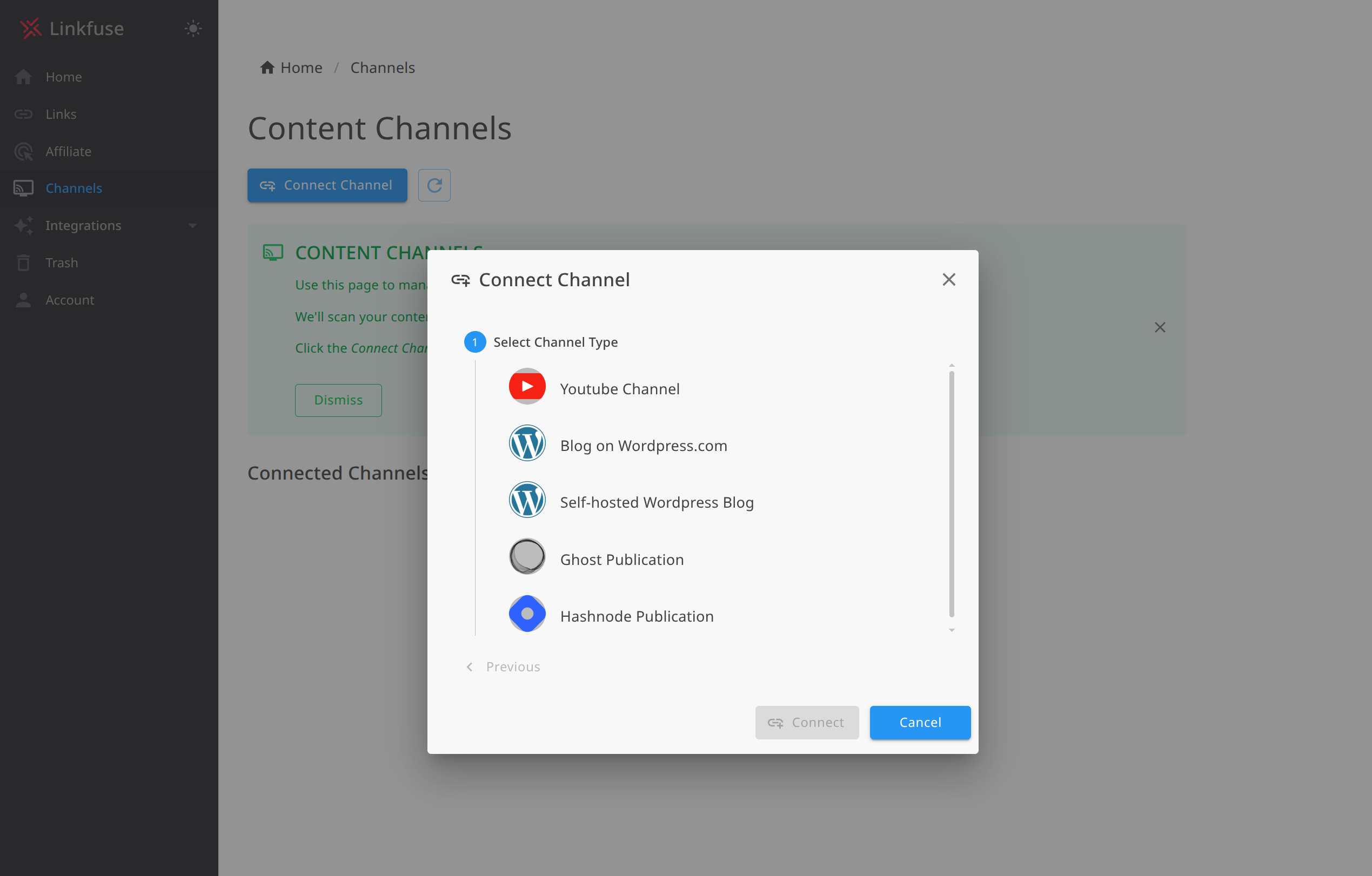
- Navigate to Channels → Add Channel
- Select YouTube from the platform options
- Click Connect with Google — you'll be taken through Google's OAuth flow
- Grant Linkfuse permission to manage your YouTube video descriptions
- Select the channel you want to connect (if you manage multiple channels)
- Click Confirm
The OAuth connection is secure and uses Google's standard authorization. Linkfuse only requests the permissions it needs to read and update video descriptions.
Step 4: Enable Automatic Monitoring
Once connected, enable real-time monitoring:
- In your YouTube channel settings within Linkfuse, find the Monitoring section
- Toggle Enable automatic monitoring to ON
- Linkfuse will periodically scan for new or updated videos
With monitoring enabled, every new upload and every description edit is detected and processed. Upload at midnight? Links are converted automatically. Update an old review with a new product recommendation? That link is processed without any manual intervention.
Step 5: Watch the Initial Scan
Linkfuse performs an initial scan of all your published videos:
- Every video description is analyzed for Amazon affiliate links
- Eligible links are converted to localized Linkfuse links
- The activity log shows exactly what was processed
You can monitor progress in your Linkfuse dashboard. For a channel with 500 videos, the scan typically completes in a few minutes.
Step 6: Verify the Integration
To confirm everything works:
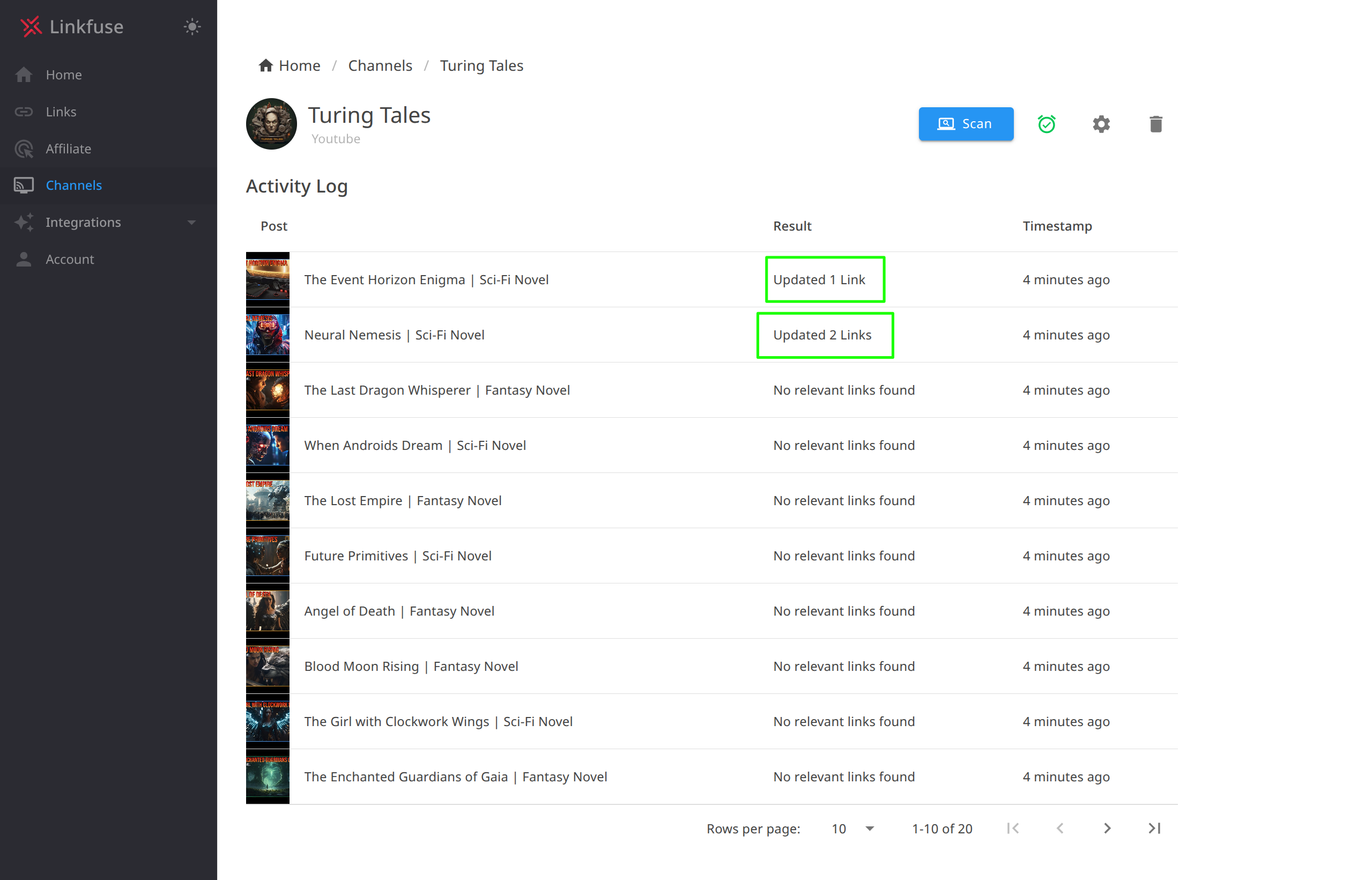
- Check the Channel activity log — you should see your videos listed with "Updated X Links" status
- Open any video on your YouTube channel
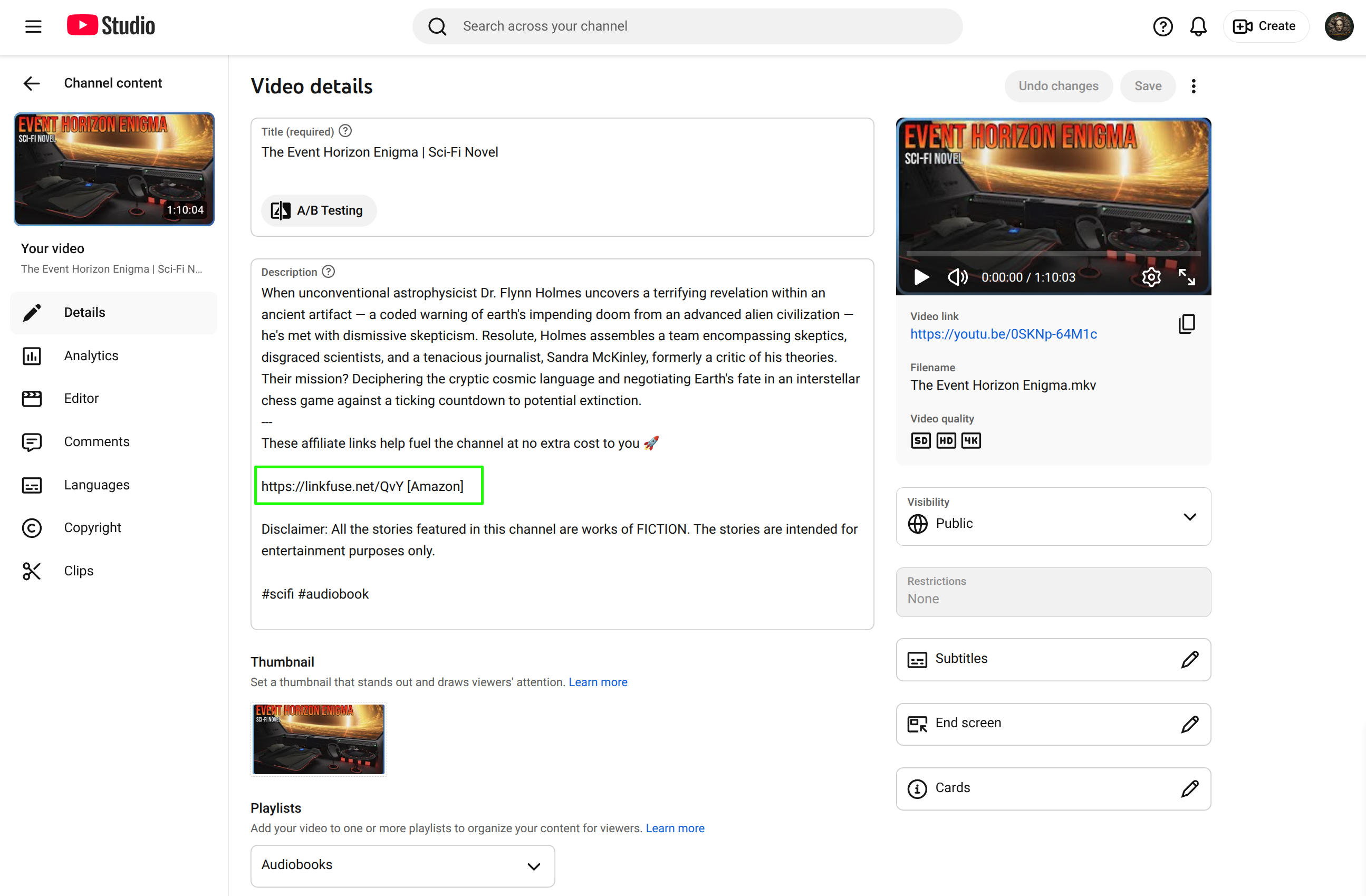
- Inspect an Amazon link in the description — it should now be a Linkfuse short link
- Click it — you should land on your local Amazon store with your affiliate tag
- Use a VPN to test from another country, or ask an international friend to try
The beauty of the YouTube Channel Optimizer: you don't need to do anything special going forward. Upload videos, drop Amazon links in the description, publish. Linkfuse handles localization automatically.
Video Before
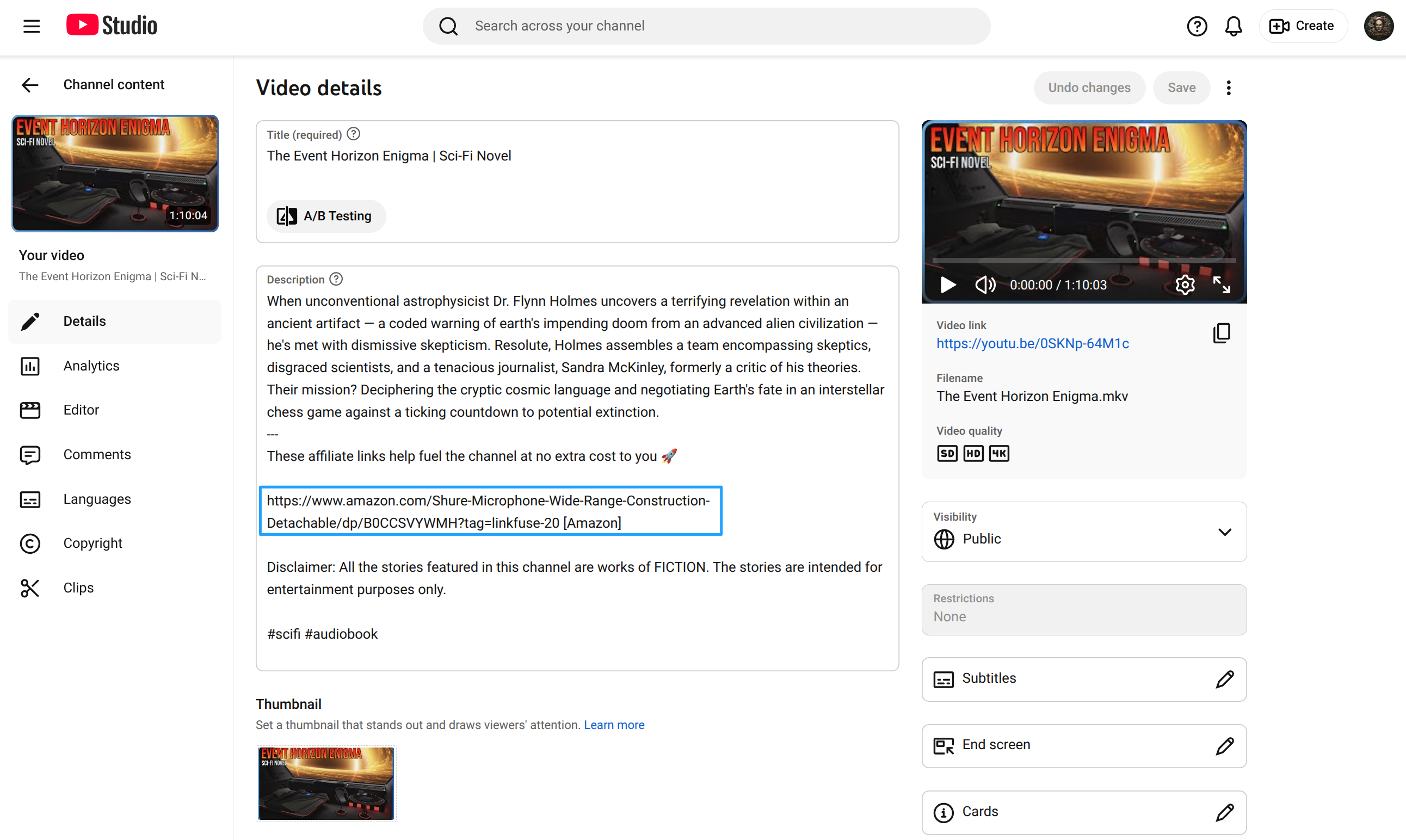
Video After
Writing Affiliate-Friendly Video Descriptions with Linkfuse
With the technical setup complete, let's talk about creating descriptions that convert.
Description Structure Best Practices
Lead with the key product link. Most viewers scan descriptions quickly. Put your primary product link in the first few lines — above the "Show more" fold.
Check out the Sony A7IV here: https://amazon.com/dp/B09JZT6YK5?tag=yourchannel-20

In this video, I compare the top mirrorless cameras for 2026...
Use clear product labels. Don't just dump URLs. Label every link so viewers know exactly what they're clicking:
🎥 GEAR MENTIONED IN THIS VIDEO:
• Sony A7IV Camera: https://amazon.com/dp/...
• Sigma 24-70mm Lens: https://amazon.com/dp/...
• Rode VideoMic Pro: https://amazon.com/dp/...
• Peak Design Travel Tripod: https://amazon.com/dp/...
Group links by category. For longer videos covering multiple products, organize your links:
📷 CAMERAS:
• Sony A7IV: https://amazon.com/dp/...
• Canon R6 II: https://amazon.com/dp/...

🎤 AUDIO:
• Rode Wireless GO II: https://amazon.com/dp/...
• Rode VideoMic Pro: https://amazon.com/dp/...

💡 LIGHTING:
• Aputure 60x: https://amazon.com/dp/...
Include a disclosure. Add a brief affiliate notice in your description:
Some links above are affiliate links — I earn a small commission
if you purchase through them, at no extra cost to you. Thanks for
supporting the channel!
Video Types That Drive Affiliate Clicks
"Best of" Roundups "Best Budget Cameras 2026" — high search volume, strong purchase intent, multiple product links per video.
Gear Tours / Setup Videos "My Home Studio Setup" — viewers want to replicate exactly what you have. Every item is a potential click.
Head-to-Head Comparisons "Sony A7IV vs Canon R6 II" — viewers are in decision mode. They'll click the link for whichever product wins.
Tutorials with Tools "How to Start a Podcast" — you mention specific equipment throughout. Viewers need the tools to follow along.
Unboxing & First Impressions Capitalize on product launch hype. These videos spike early and drive impulse purchases.
Leveraging Pinned Comments
YouTube's pinned comment is prime real estate. Use it to highlight your top product link or a special deal:
🔥 The Sony A7IV is currently $300 off! Grab it here: [link]
Linkfuse processes links in descriptions, so use your regular Amazon links in the description and let Linkfuse handle localization. For pinned comments, you can use a Linkfuse short link directly.
Advanced YouTube + Linkfuse Features
The Content Channel Activity Log
Every link conversion is logged, giving you full visibility into what Linkfuse has processed. The activity log shows:
- Video title and thumbnail for each processed video
- Action taken (e.g., "Updated 5 Links", "No eligible links found")
- Timestamp of when processing occurred
- Full audit trail of all changes
This transparency lets you verify that links are being converted correctly and track optimization progress across your entire video library. If something looks wrong, you can see exactly what happened and when.
Retroactive Optimization
This is where the YouTube Channel Optimizer truly shines. That gear review you uploaded two years ago? It's still ranking in search results, still getting views, but every Amazon link in the description points to amazon.com for everyone — regardless of where they're watching from.
When you connect your channel, Linkfuse doesn't just process new uploads — it scans your entire video archive. Every published video, no matter how old, gets its affiliate links localized. Revenue you've been losing for years starts flowing immediately.
For a channel with 500+ videos, this retroactive optimization alone can represent thousands of dollars in recovered annual revenue. And unlike a blog where old posts might get buried, YouTube videos continue to surface through search and recommendations indefinitely.
Non-Destructive Link Conversion
Linkfuse wraps your existing links rather than replacing them destructively. Your original Amazon URLs are preserved in the Linkfuse system, and the conversion process doesn't break your description formatting, timestamps, or other content. If you ever need to disconnect the integration, you can export your link data.
Product Display Widgets (Optional Enhancement)
For creators who also maintain a website or landing page alongside their YouTube channel, Linkfuse's Product Displays let you embed professional product cards. These can be linked from your video descriptions to a dedicated "gear page" on your site, providing viewers with a richer browsing experience.
Custom Tracking with UTM Parameters
Linkfuse preserves UTM parameters, so you can track which videos drive the most conversions:
https://lnkf.us/a1b2c3?utm_source=youtube&utm_medium=description&utm_campaign=camera-review
Combine this with YouTube Studio analytics to understand your full funnel — from view to click to purchase.
Analytics and Optimization
Reading Your Linkfuse Dashboard
Key metrics to monitor:
- Clicks by country: See which regions engage with your product links
- Device breakdown: Mobile vs. desktop — YouTube mobile viewers click differently
- Top performing links: Double down on what works
- Click-through by video: Which videos drive the most affiliate interest
Geographic Insights
Pay attention to which countries convert best. You might discover:
- German viewers love your camera equipment content
- UK viewers engage more with home office and productivity gear
- Canadian traffic spikes during Black Friday and holiday season
- Australian viewers convert well on outdoor and fitness equipment
Use these insights to create content that resonates with your international audience — or to decide which new Amazon regional programs to join.
Optimization Workflow
- Monthly: Review top-performing videos in YouTube Studio
- Monthly: Cross-reference with Linkfuse click data to identify high-converting videos
- Quarterly: Update descriptions on your best videos with fresh product links
- Quarterly: Create new content targeting high-performing regions or product categories
- Ongoing: When a product goes out of stock, update the description link — Linkfuse re-processes automatically
Real Results: A Case Study
Background: Jake runs a YouTube channel reviewing photography and videography gear. He's been uploading consistently for four years and has 800+ videos in his library. His audience: 1.2 million monthly views, 60% from outside the United States.
Before Linkfuse:
- International conversion rate: 0.3%
- Monthly international affiliate revenue: $420
- Four years of videos with US-only Amazon links in descriptions
- No practical way to update hundreds of existing video descriptions manually
After connecting YouTube as a Content Channel:
- Initial scan processed all 800 videos in under 15 minutes
- 2,400+ Amazon links automatically converted to localized links
- International conversion rate jumped to 2.5%
- Monthly international affiliate revenue: $3,600
Key wins:
- Retroactive optimization: Four years of content monetized properly overnight — no manual editing of hundreds of video descriptions
- German and UK viewers (his largest non-US segments) now convert at nearly US rates
- Zero workflow changes: He keeps uploading and adding Amazon links exactly as before; Linkfuse handles localization automatically
- Activity log visibility: He can see exactly which videos were processed and how many links were converted
Total revenue increase: 42% from international traffic alone — plus the recovered revenue from his entire back catalog that was previously leaking commissions.
Alternative Approaches
For completeness, here are other options and their limitations:
Manual Multi-Region Links
Approach: List separate Amazon links for each region in every video description.
🇺🇸 US: https://amazon.com/dp/...
🇬🇧 UK: https://amazon.co.uk/dp/...
🇩🇪 DE: https://amazon.de/dp/...
🇨🇦 CA: https://amazon.ca/dp/...
Problems for YouTube creators:
- Clutters your description with 5-6 links per product instead of one
- Viewers in unlisted countries still get no localized experience
- Massive time investment — multiply by every product in every video
- Doesn't scale as your video library grows
Amazon OneLink
Approach: Amazon's official (and free) localization tool.
Problems for YouTube creators:
- Requires JavaScript — doesn't work in YouTube descriptions (plain text)
- Even on websites, it's blocked by ad blockers
- Poor product matching — often sends to search results, not product pages
- No mobile deep linking
- Limited analytics
Other Services
| Service | Strengths | YouTube-Specific Issues |
|---|---|---|
| Geniuslink | Established, reliable | No native YouTube integration — requires manual link creation for every product |
| Skimlinks | Automatic link conversion | JavaScript-based — doesn't work in YouTube descriptions |
| VigLink | Broad retailer network | Same JavaScript limitation — designed for websites, not video platforms |
Linkfuse's native YouTube Channel Optimizer is the key differentiator. Other services either require JavaScript (which doesn't work in YouTube descriptions) or require you to manually create localized links one by one. Linkfuse connects directly to your YouTube channel, scans every video description, and converts links automatically — including your entire back catalog. No other service offers this level of YouTube-specific automation.
Troubleshooting
YouTube Channel Connection Issues
OAuth Connection Fails
If Linkfuse can't connect to your YouTube channel:
- Ensure you're signing in with the Google account that owns or manages the channel
- If you manage multiple channels, make sure you select the correct one during authorization
- Try revoking Linkfuse's access in your Google Account permissions and reconnecting
- Clear your browser cache and cookies, then try again
Channel Not Appearing After Connection
If the connection succeeds but your channel doesn't appear:
- Verify your YouTube channel is in good standing and not restricted
- Ensure your channel has at least one published video
- Check that you granted all requested permissions during the OAuth flow
Links Not Converting in Descriptions
If videos are being processed but links aren't converting:
- Verify you have active affiliate programs configured in Linkfuse (Settings → Affiliate Tags)
- Check that the product links in your descriptions are valid Amazon URLs
- Ensure videos are published (private and unlisted videos may not be processed)
- Review the channel activity log to see which links were eligible for conversion
New Videos Not Processing Automatically
If automatic monitoring isn't working:
- Verify that monitoring is toggled ON in your channel settings
- Check that the OAuth connection is still active (Google may revoke access if you change your password)
- Try manually triggering a scan from the channel settings page
General Issues
Links not redirecting properly
- Clear your browser cache
- Verify your affiliate tags are entered correctly in Linkfuse
- Test in an incognito window
Analytics not showing clicks
- Clicks can take up to an hour to appear
- Ad blockers may prevent some tracking
- Verify the link is actually a Linkfuse link (check for
lnkf.usor your custom domain)
Mobile Considerations
Over 70% of YouTube watch time happens on mobile devices. Keep in mind:
- Linkfuse links work on mobile browsers and redirect correctly
- Mobile viewers are more likely to be international (watching on the go, traveling)
- Short, clean Linkfuse links look better on mobile than long Amazon URLs with tracking parameters
Getting Started Today
Your YouTube channel already attracts international viewers. The only question is whether you'll monetize them.
Here's your action plan:
- Today: Check YouTube Studio analytics for your international viewership percentage
- This week: Sign up for Linkfuse and add your regional Amazon affiliate tags
- This week: Connect your YouTube channel as a Content Channel
- Watch: Linkfuse scans your entire video archive and converts every eligible link automatically
- Next month: Compare your international conversion rates
The integration takes less than 5 minutes. Your entire video library — past, present, and future — is optimized automatically. No manual link creation. No workflow changes. No going back through hundreds of old video descriptions.
Sign up for Linkfuse and see the difference proper link localization makes for your YouTube channel.
Have questions about setting up Linkfuse with your YouTube channel? Check our Knowledge Base or reach out to support — we're happy to help creators get the most from their affiliate content.