
Connecting a Ghost Publication
Ghost is a powerful open-source publishing platform favored by professional content creators and publishers. By connecting your Ghost publication to Linkfuse, you can automatically convert product links throughout your content into tracked affiliate links with intelligent geo-targeting capabilities. This means visitors from different countries are automatically redirected to their local Amazon store, maximizing your earning potential while providing a better user experience.
Prerequisites
Before you begin, ensure you have:
- An active Linkfuse account
- A Ghost publication with Owner or Administrator access
- Ghost Admin API access (available in Ghost 2.0+)
- Posts containing product links you want to monetize
Step-by-Step Setup Instructions
Step 1: Create a Custom Integration in Ghost
First, you'll need to generate an Admin API key from your Ghost publication:
- Log in to your Ghost Admin panel
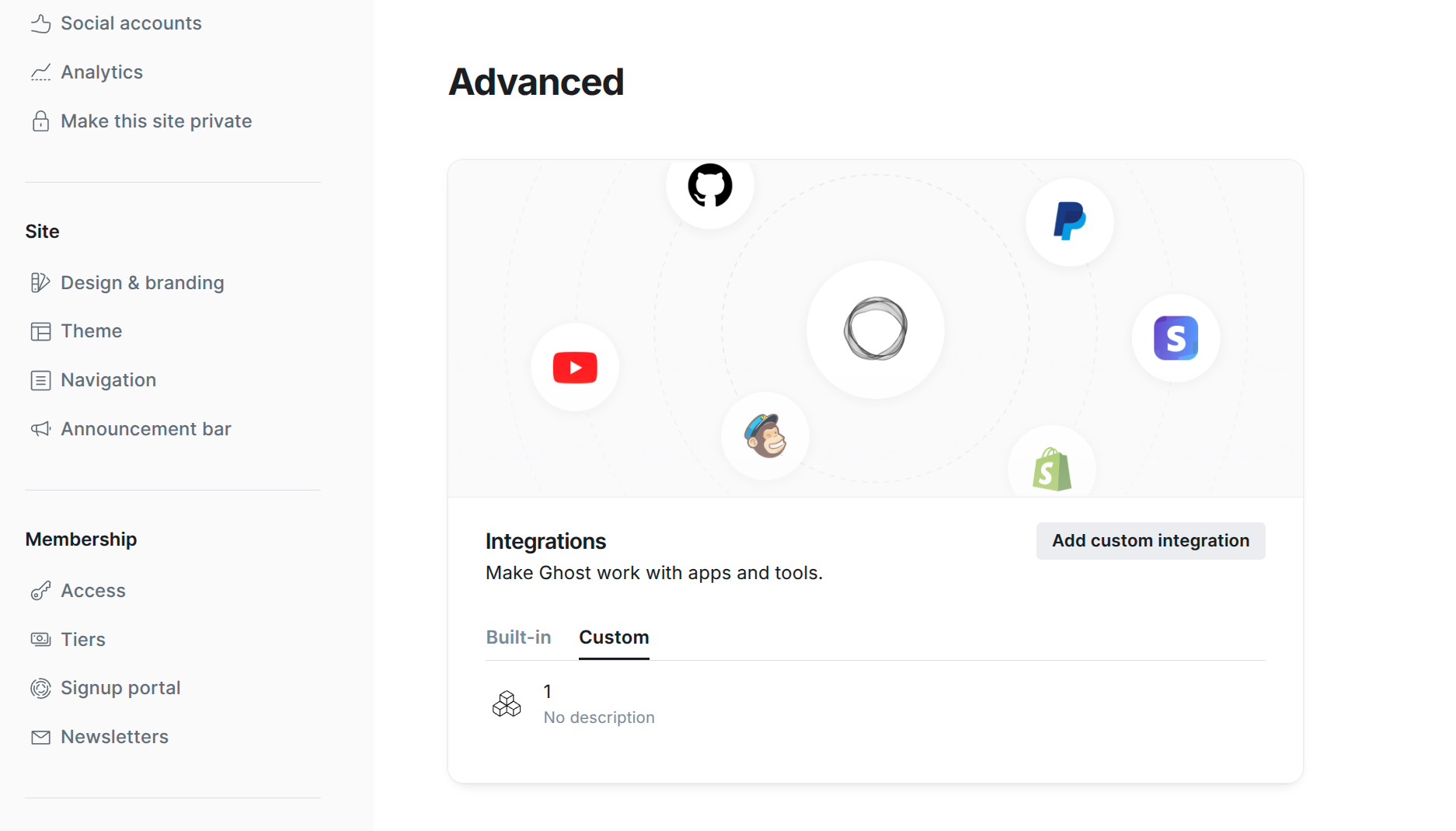
- Navigate to Settings → Integrations
- Scroll to the "Custom integrations" section
- Click + Add custom integration
- Name the integration "Linkfuse" (or any name you prefer)
- Once created, you'll see your integration details
- Copy the Admin API Key - it will be in the format
id:secret(two parts separated by a colon) - Also note your API URL - this shows your Ghost site's base URL
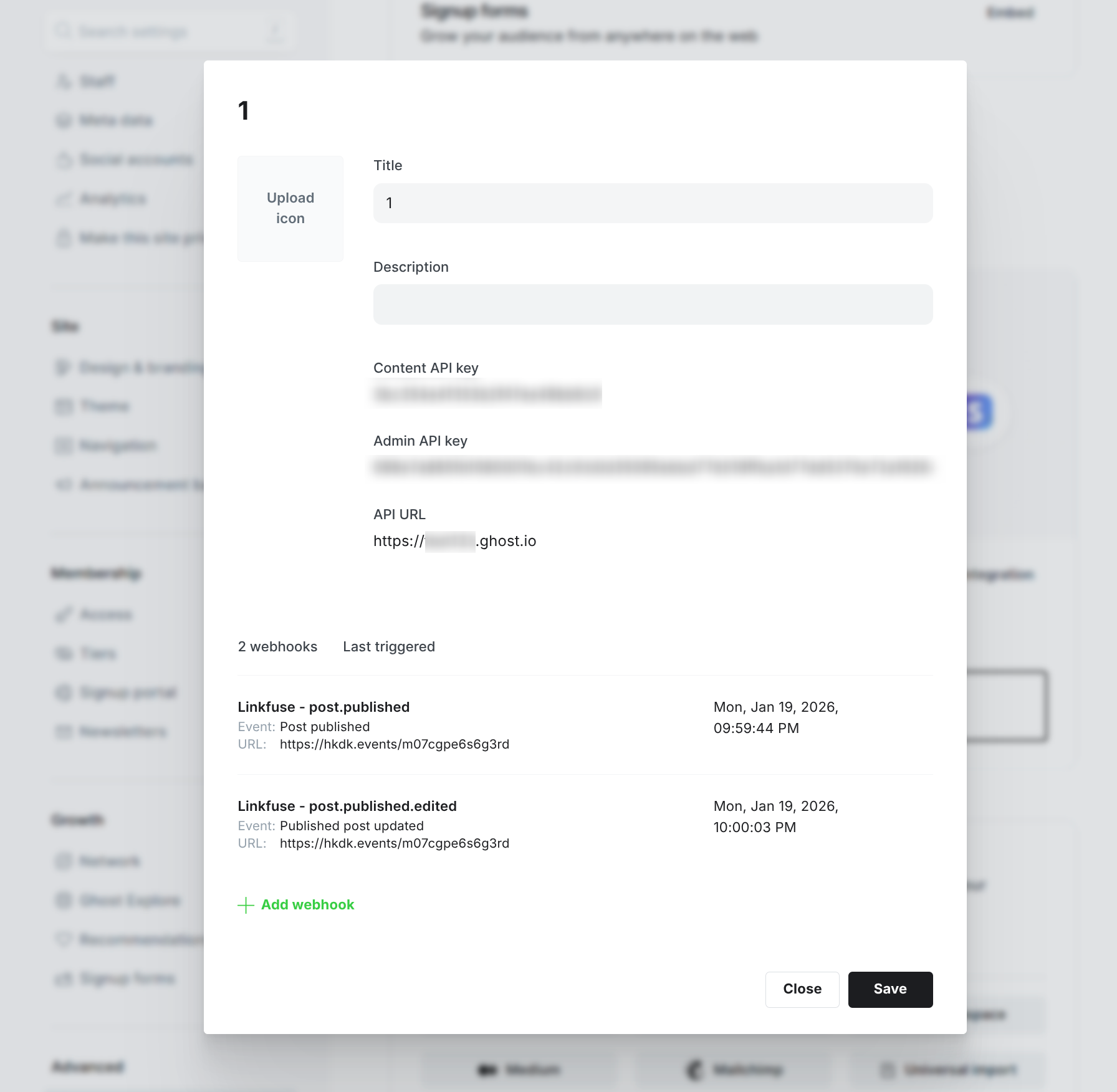
Important: Keep this API key secure. It provides administrative access to your Ghost publication.
Step 2: Connect Ghost to Linkfuse
Now you'll add Ghost as a channel in Linkfuse:
- Log in to your Linkfuse dashboard
- Navigate to Channels → Add Channel
- Select Ghost from the list of available platforms
- Enter your Ghost Site URL (e.g.,
https://myblog.ghost.ioor your custom domain)
- Include the full URL with
https:// - Do not include trailing slashes or
/ghost/paths
- Paste the Admin API Key you copied from Ghost (in
id:secretformat) - Click Connect
Linkfuse will verify the connection and confirm when your Ghost publication is successfully connected.
Step 3: Configure Automatic Monitoring
Once connected, Linkfuse can automatically monitor your Ghost publication for new and edited posts:
- In your Ghost channel settings, locate the Monitoring section
- Toggle Enable automatic monitoring to ON
- Linkfuse will create webhooks in your Ghost publication for:
post.published- Processes new posts when they're publishedpost.published.edited- Processes posts when they're updated <img src="./ghost-monitoring-setup.png" alt="Enabling automatic monitoring for Ghost"/>
With monitoring enabled, you'll never need to manually trigger link conversions. Linkfuse works in the background, processing your content automatically.
Note: Webhook requests are secured using HMAC signature verification to ensure only authorized requests from Ghost are processed.
Step 4: Initial Scan and Link Conversion
After connecting your Ghost publication:
- Linkfuse will perform an initial scan of your existing published posts
- The system identifies eligible product links (Amazon, affiliate networks, etc.)
- These links are automatically replaced with Linkfuse tracking links
- Your original URLs are preserved within the Linkfuse system for reference
You can view the scan progress and results in your Linkfuse dashboard under the Ghost channel details.
What Happens After Connection
Once your Ghost publication is connected to Linkfuse, here's how the system works:
For Existing Posts:
- Linkfuse scans all published posts in your Ghost publication
- Product links matching your configured affiliate programs are identified
- Links are replaced with Linkfuse short links that include tracking parameters
- The conversion process is non-destructive - your post content structure remains intact
For New Posts:
- When you publish a new post in Ghost, the webhook automatically notifies Linkfuse
- Linkfuse processes the post within seconds of publication
- Eligible links are converted before most visitors see the post
- No manual action required on your part
For Edited Posts:
- When you update an existing post, Linkfuse receives a webhook notification
- New links added during the edit are automatically processed
- Existing Linkfuse links remain functional
Benefits of Using Ghost with Linkfuse
Automatic Affiliate Link Conversion
Forget about manually creating and inserting affiliate links. Linkfuse automatically detects product links in your Ghost posts and converts them to tracked affiliate links. This saves hours of tedious work and ensures consistent link monetization across your entire publication.
Intelligent Geo-Targeting
When a reader clicks on an Amazon link in your Ghost post, Linkfuse automatically detects their location and redirects them to their local Amazon store (amazon.co.uk for UK visitors, amazon.de for German visitors, etc.). This increases conversion rates since visitors can purchase in their local currency with familiar shipping options.
Real-Time Monitoring
With webhooks enabled, Linkfuse processes your content in real-time. Publish a new post at 3 AM? The links are converted immediately. Update an old post with new product recommendations? Those links are processed automatically without any manual intervention.
Comprehensive Analytics
Track the performance of links across your entire Ghost publication. See which posts generate the most clicks, which products resonate with your audience, and how your affiliate revenue breaks down by article, product category, or time period.
Non-Destructive Implementation
Linkfuse wraps your existing links rather than replacing them entirely. Your original URLs are preserved in the Linkfuse system, and if you ever disconnect the integration, you can export your link data. The process respects your content and doesn't introduce formatting issues or broken links.
Multi-Author Support
If your Ghost publication has multiple authors, Linkfuse works seamlessly across all contributors. Every author's posts are processed automatically according to your global link conversion rules - no need to train your team on affiliate link management.
Troubleshooting Common Issues
Invalid Admin API Key Error
Problem: Linkfuse cannot connect to your Ghost publication and shows an "Invalid API Key" error.
Solution:
- Ensure your API key is in the correct format:
id:secret(two parts separated by a colon) - Verify you copied the entire key including both parts
- Make sure there are no extra spaces before or after the key
- Confirm you're using the Admin API Key, not the Content API Key
Site URL Format Issues
Problem: Connection fails with "Invalid URL" or "Cannot reach Ghost site" errors.
Solution:
- Use the full URL including
https://(e.g.,https://myblog.ghost.io) - Do not include trailing slashes: use
https://myblog.comnothttps://myblog.com/ - Do not include path segments like
/ghost/or/admin/ - For custom domains, ensure DNS is properly configured and the site is accessible
Webhook Creation Failures
Problem: Ghost connection succeeds but monitoring cannot be enabled.
Solution:
- Verify your Ghost user account has Administrator or Owner permissions
- Check that your Ghost version is 2.0 or higher (webhooks require Ghost 2.0+)
- Ensure your Ghost installation allows outbound webhooks (some hosting providers restrict this)
- Review your Ghost error logs in Settings → Labs → Download logs
Links Not Converting in Posts
Problem: Posts are being processed but links aren't converting to Linkfuse links.
Solution:
- Verify you have active affiliate programs configured in Linkfuse
- Check that the product links in your posts match your configured affiliate networks
- Ensure posts are published (drafts and scheduled posts aren't processed)
- Review the channel activity log to see which links were eligible for conversion