
Connecting a Hashnode Publication
Hashnode is a popular developer-focused blogging platform with built-in community features, making it an ideal choice for tech bloggers and developers sharing tutorials, reviews, and technical insights. If you write about developer tools, programming books, hardware, or online courses, connecting your Hashnode publication to Linkfuse enables automatic affiliate link conversion with intelligent geo-targetingensuring your readers are directed to their local Amazon store while you earn commissions on product recommendations.
Prerequisites
Before connecting your Hashnode publication to Linkfuse, ensure you have:
- An active Linkfuse account
- A Hashnode publication (free or Pro tier)
- Publication owner or admin access
- Published posts containing product links you want to monetize
Step-by-Step Setup Instructions
Step 1: Generate a Personal Access Token in Hashnode
Linkfuse connects to Hashnode using its modern GraphQL API, which requires authentication via a Personal Access Token (PAT).
- Log in to your Hashnode account
- Click your profile picture in the top-right corner
- Select Account Settings from the dropdown menu
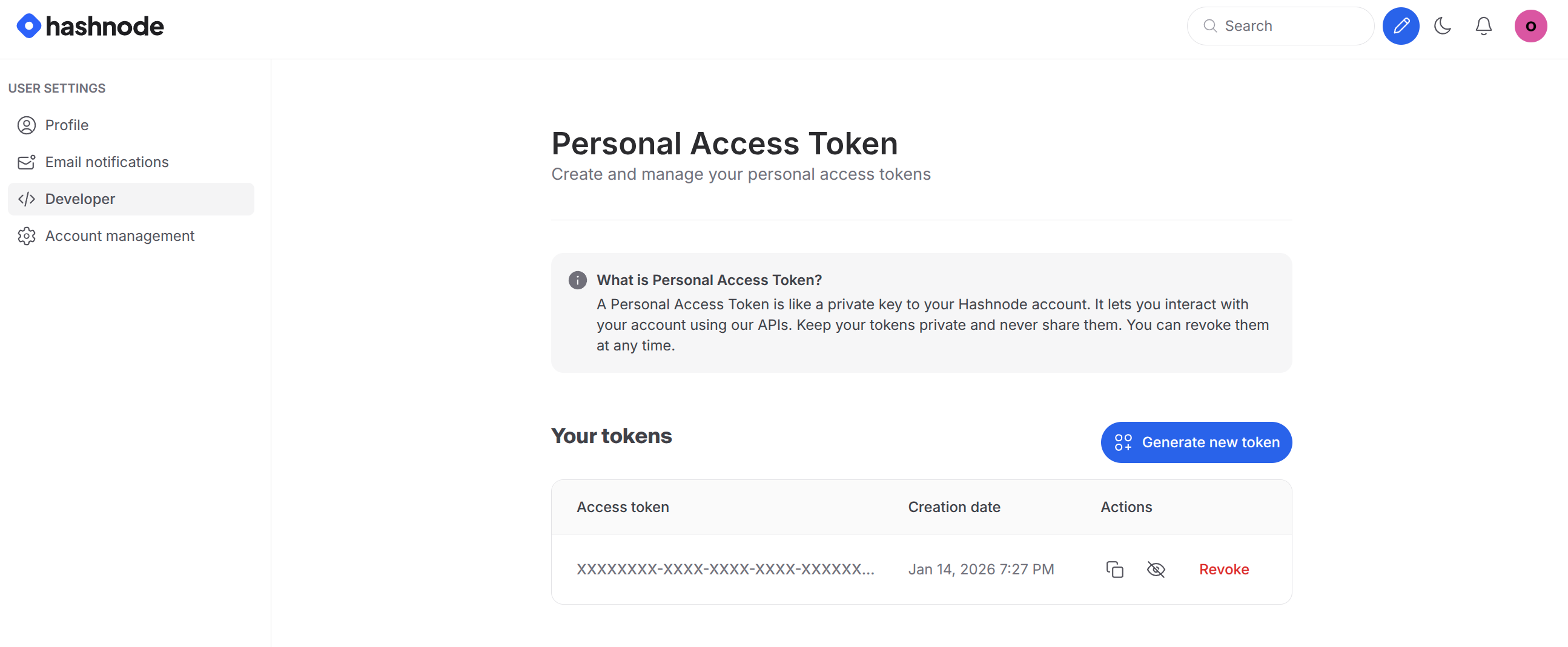
- Navigate to Developer Settings in the sidebar
- Click "Generate New Token"
- Give your token a descriptive name like "Linkfuse Integration"
- Copy the token immediately---it will only be displayed once
Important: Store this token securely in a password manager. It provides API access to your Hashnode account and cannot be retrieved later.
Step 2: Connect Hashnode to Linkfuse
With your Personal Access Token ready, you can now establish the connection:
- Log in to your Linkfuse dashboard
- Navigate to Channels → Add Channel
- Select "Hashnode" from the available platform list
- Enter your Hashnode publication URL
- Use your subdomain:
https://myblog.hashnode.dev - Or your custom domain:
https://blog.yourdomain.com
- Paste your Personal Access Token into the authentication field
- Click Connect
Linkfuse will query Hashnode's GraphQL API at https://gql.hashnode.com to verify the connection and retrieve your publication details, including the Publication ID needed for future operations.
Step 3: Enable Automatic Monitoring
Once connected, enable real-time webhook monitoring to process new and edited posts automatically:
- In your Hashnode channel settings, locate the Monitoring section
- Toggle "Enable automatic monitoring" to ON
- Linkfuse automatically creates secure webhooks for:
POST_PUBLISHED--- Processes new posts immediately when publishedPOST_UPDATED--- Processes posts whenever you make edits
Webhooks use signature verification to ensure secure communication between Hashnode and Linkfuse.
Step 4: Initial Scan and Link Conversion
After establishing the connection, Linkfuse performs an initial scan:
- All existing published posts are retrieved from your publication
- Product links within your markdown content are identified
- Eligible links are automatically converted to tracked Linkfuse short links
- Your original markdown structure and formatting remain intact
- Posts are updated via Hashnode's
UpdatePostGraphQL mutation
What Happens After Connection
Existing Posts: Linkfuse scans your entire publication and converts eligible product links to tracked affiliate links while preserving your markdown formatting.
New Posts: When you publish new content, the POST_PUBLISHED webhook triggers automatically. Linkfuse processes the post, converts product links, and updates the content---all without manual intervention.
Edited Posts: Any time you update a published post, the POST_UPDATED webhook notifies Linkfuse to re-scan the content and ensure all links are properly tracked.
Benefits of Using Hashnode with Linkfuse
Markdown-Native Integration: Linkfuse works directly with Hashnode's markdown content format, ensuring seamless link conversion without breaking your code blocks or formatting.
Geo-Targeting for Global Audiences: Tech content attracts international readers. Linkfuse automatically redirects visitors to their local Amazon store (amazon.com, amazon.co.uk, amazon.de, etc.), improving conversion rates.
Perfect for Developer Content: Monetize recommendations for programming books, development tools, hardware (laptops, monitors, keyboards), online courses, and software subscriptions.
Real-Time Automation: No manual link replacement needed. New and updated posts are processed automatically via webhooks.
Comprehensive Analytics: Track clicks and conversions across all your Hashnode content from the Linkfuse dashboard.
Developer-Friendly: Built on Hashnode's modern GraphQL API, ensuring reliable, secure, and performant integration.
Troubleshooting Common Issues
Invalid Personal Access Token Error
- Token expired or revoked: Generate a new token in Hashnode Developer Settings
- Missing required permissions: Ensure the token has access to your publication
- Token not copied correctly: Verify no extra spaces or characters were included
Publication Not Found
- Verify your publication URL is entered correctly (including
https://) - Ensure the PAT has access to the specified publication
- Check if you're using a custom domain versus the default
hashnode.devsubdomain
Webhook Creation Failures
- Verify you have owner or admin permissions on the publication
- Check Hashnode's webhook limits for your plan tier
- Review Hashnode's webhook settings to ensure no conflicts exist
Links Not Converting
- Ensure posts are published---drafts are not processed
- Verify your affiliate programs are properly configured in Linkfuse
- Check that markdown links use standard format:
[text](url) - Confirm the links point to supported retailers (Amazon, etc.)